「ソフトウェア(softwear)」カテゴリーアーカイブ

gimp:すべてのレイヤーを一枚づつ保存

すべてのレイヤーを一枚づつファイルに保存する方法
How to save all layers one by one in a file

GIMP 2.10

スクリプト
script
export-layers.scm
http://www.geocities.jp/gimproject1/scripts/export-layers/

これを、日本語で作成されています
本当に便利なツールを作成者された方に感謝
これを迷わす、設定した自分のプロファイルに
This is created in Japanese
Thanks to those who were author of really useful tools
Incorporating this into my profile you set

C:\Users\[ユーザ]\AppData\Roaming\GIMP\2.10\scripts
初めに、ファイル レイヤーをエクスポートが表示されなかったら
これで再度読み込み
Initially, if exporting file layers is not displayed
Now reload

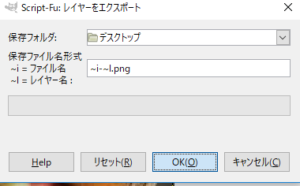
005

SnapCrab_NoName_2018-6-7_10-25-58_No-00

これで、デスクトップに画像が保存される。
Now, the image is saved to the desktop.

gimp:画像のスライスをレイヤーに分割する

webを何とか1枚の画像にしたが、印刷するには非常に難しい。
I somehow made the web one image, but it is very difficult to print.

SnapCrab_NoName_2018-6-7_9-54-21_No-00

SnapCrab_NoName_2018-6-7_9-53-30_No-00
エクセルを使っても、解像度を調整したりとちょっとイラッとする。
そこで、できないかと調べたらできました。
GIMP 2.10

Even if I use Excel or CALC, I adjust it to a bit as I adjust the resolution.
So, I was able I checked whether can not.
GIMP 2.10

プラグイン
Plugin

Split layer into tiles
http://registry.gimp.org/node/25110
続きを読む gimp:画像のスライスをレイヤーに分割する

gimp:GIMP is 2.10.2が出たね

今回のbug対策、HEIFサポートとfiltersの新しい対応ようです
This bug countermeasure, HEIF support and filters are new correspondence

本体ダウンロード
Download
https://www.gimp.org/

変更の内容
https://www.gimp.org/news/2018/05/20/gimp-2-10-2-released/
The contents of change

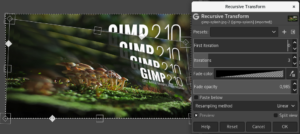
その中のRecursive Transform
The Recursive Transform
gimp-2-10-2-recursive-transform

HEIFフォーマットって?
What is HEIF format?
https://en.wikipedia.org/wiki/High_Efficiency_Image_File_Format

恩恵を受けるのは、今の所、win10やIOSの一部
Windows 10 Build 17623にて、「High Efficiency Image File (HEIF)」形式の画像フォーマット対応を発表!

iPhone 7/7 Plus以降のモデルのみ
SnapCrab_NoName_2018-5-21_15-25-12_No-00
It is beneficial to take part in win10 or IOS
Windows 10 Build 17623 announces “High Efficiency Image File (HEIF) format image format support”!

iPhone 7/7 Plus or later models only

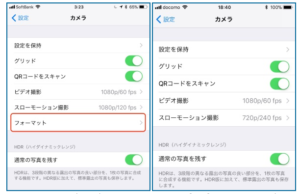
iPhone 7 Plusのカメラ設定画面(左)には「フォーマット」の項目
iPhone 6sのカメラ設定画面(右)にはない

「高効率」と「互換性優先」の2つ。
In the camera setting screen (left) of iPhone 7 Plus, the item “Format”
Not on iPhone 6s camera setting screen (right)

“High efficiency” and “Compatibility priority” two.

この最後に、とうとうGIMP3に着手したようです。
既に、GIMP2高速化は、望めないということでしょうねきっと。
Finally, it seems that we finally started GIMP 3.
Already, it is surely impossible to expect GIMP 2 speedup surely.