
webを何とか1枚の画像にしたが、印刷するには非常に難しい。
I somehow made the web one image, but it is very difficult to print.


エクセルを使っても、解像度を調整したりとちょっとイラッとする。
そこで、できないかと調べたらできました。
GIMP 2.10
Even if I use Excel or CALC, I adjust it to a bit as I adjust the resolution.
So, I was able I checked whether can not.
GIMP 2.10
プラグイン
Plugin
Split layer into tiles
http://registry.gimp.org/node/25110
このファイルエンコード LF TS-620のようなので
問題はないのですが、LF UTF-8に変更。
忘れやすいのでプラグインを変更しました
As this file encoding LF TS-620 is like
There is no problem but changed to LF UTF-8.
I changed plug-in because I forget easily
日本語対応に
For Japanese correspondence
register(
‘split_layer_into_tiles’,
‘Split a layer into many layers, one for each tile’,
‘Split a layer into many layers, one for each tile. This is useful for editing tile-based images for some games and applications.’,
を
register(
‘画像のスライスをレイヤーに分割する’,
‘画像をスライスした各タイルをレイヤーにします。これは、一部のゲームやアプリケーションのタイルベースの画像を編集する場合に便利です’,
(PF_SPINNER, ‘tile-width’, ‘Tile _Width’, 16, (2,65536,2)),
(PF_SPINNER, ‘tile-height’, ‘Tile _Height’, 16, (2,65536,2)),
を
(PF_SPINNER, ‘tile-width’, ‘Tile _Width px[横ピクセル]’, 16, (2,65536,2)),
(PF_SPINNER, ‘tile-height’, ‘Tile _Height px[縦ピクセル]’, 16, (2,65536,2)),
格納場所は、
個人のプロファイル場所
The storage location is
Personal profile location
C:\Users\[ユーザ]\AppData\Roaming\GIMP\2.10\plug-ins
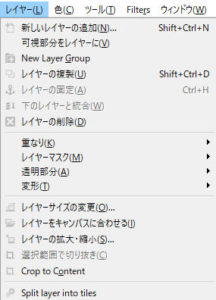
split_layer_into_tiles をクリック、少々起動に時間がかかる
1秒程度
split_layer_into_tiles Click, take a while to start a little
About 1 second

この様に画面が出るとあとは、スライスの幅を指定します。
指定は、ピクセルなので、
After the screen comes out like this,Specify the width of the slice.
Since the designation is pixel,
トップバーの右端に 優しく記載 275*183
横*縦 なので、これを計算機で何分割にするかなー?て考えて入れればいい。
今回は、4分割だったので割り切れない。
275/2=137.5
183/2=91.5
この場合は、必ず最小整数入れる 137 と91
そうすれば、右上よりその幅でスライスして、それをレイヤー枚に作成してくれる。
割り切れなから画像も、別なレイヤーとなるので事前の切り取りは不要。
右からなので割安。
非常に便利なツールを作成してくれた方に感謝。
Gently described on the right end of the top bar 275 * 183
Horizontal * Vertical So,
You wonder to what split this computer?
I If you put thought.
This time, because it was divided into 4, it is not divisible.
275/2 = 137.5
183/2 = 91.5
In this case, the smallest integer put 137 always 91
that way,
Slice at that width from the upper right,
Us to create it to a layer sheets.
Because the image is also divisible, it becomes another layer so it is unnecessary to cut beforehand.
Because it is from the right, it is cheap.
Thanks to those who created very useful tools.