「SDが破損」タグアーカイブ

raspberry Pi 2+のOS SDが破損!再構築! SDにOSを入れる:OS SD of raspberry Pi 2+ is damaged! Rebuild! Put the OS in SD

raspberry Pi 2+のOS SDが破損!再構築!
自宅のraspberry Pi 2初号機
6年目でマイクロSDの故障!
急遽、再構築を行ってみた。
Fedora 21が導入していたが、すでに古い。
(+_+)>
とりあえず、最新版を導入
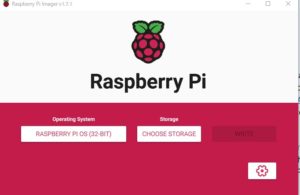
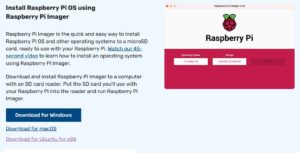
https://www.raspberrypi.com/software/
SnapCrab_NoName_2022-2-20_3-19-24_No-00

マイクロSDを装着して
SnapCrab_NoName_2022-2-20_3-20-25_No-00

CHOOSE STOREGEで、マイクロSDを選択
ほどなく終了するので、それを、raspberry Piに装着して電源をON

———————-

OS SD of raspberry Pi 2+ is damaged! Rebuilding!
The first raspberry Pi 2 at home
Micro SD failure in the 6th year!
I hurriedly tried to rebuild it.
Fedora 21 had introduced it, but it’s already old.
(+ _ +)>
Introducing the latest version for the time being

With micro SD attached

Select Micro SD in CHOOSE STOREGE
It will be finished soon, so attach it to the raspberry Pi and turn on the powe

———————-
———————-

OS SD von Raspberry Pi 2+ ist beschädigt! Wiederaufbau!
Der erste Raspberry Pi 2 zu Hause
Micro SD Ausfall im 6. Jahr!
Ich habe eilig versucht, es wieder aufzubauen.
Fedora 21 hatte es eingeführt, aber es ist schon alt.
(+ _ +)>
Wir stellen vorerst die neuste Version vor

Mit angeschlossener Micro-SD

Wählen Sie Micro SD in SPEICHER AUSWÄHLEN
Es wird bald fertig sein, also befestigen Sie es am Himbeer-Pi und schalten Sie es ei

———————-
———————-

L’OS SD du raspberry Pi 2+ est endommagé ! Reconstitution!
Le premier Raspberry Pi 2 à la maison
Panne de Micro SD en 6ème année !
J’ai essayé de le reconstruire rapidement.
Fedora 21 l’avait introduit, mais il est déjà ancien.
(+ _ +)>
Présentation de la dernière version pour le moment

Avec micro SD attaché

Sélectionnez Micro SD dans CHOISIR STOREGE
Il sera bientôt terminé, alors attachez-le au Raspberry Pi et allumez-l

———————-

NAS構築に、Raspberry Pi3以上は使わない方が良いのは、あまりにも電力を
消耗するから、ラズパイ3に最適なACアダプター 5V/3.0A
既にこれが異常
コスパでは全くない。
ラズパイ4に最適なACアダプター 5V/4.0A
ノートブックなどのアダプタより、高性能だろこれだと
5Vにしている意味が無い。

———————-

It is better not to use Raspberry PI3 or higher to build NAS, too power
AC adapter 5V / 3.0A ideal for Raz-pie 3 because it is exhausted
This is already abnormal
It is not at all in cospa.
AC adapter 5V / 4.0A perfect for Raz-pie 4
It is high performance than an adapter such as a notebook
There is no meaning that is 5V

———————-
———————-

Es ist besser, Raspberry PI3 oder höher nicht zu verwenden, um NAS zu bauen, zu der Leistung
AC-Adapter 5V / 3.0A Ideal für RAZ-PIE 3, weil es erschöpft ist
Dies ist bereits abnormal
Es ist überhaupt nicht in Cospa.
AC-Adapter 5V / 4.0A perfekt für RAZ-PIE 4
Es ist eine hohe Leistung als ein Adapter wie ein Notebook
Es ist keine Bedeutung, die 5V ist

———————-
———————-

Il vaut mieux ne pas utiliser de framboise PI3 ou plus pour construire des NAS, trop de puissance
Adaptateur secteur 5V / 3.0A Idéal pour Raz-Pie 3 parce qu’il est épuisé
Ceci est déjà anormal
Ce n’est pas du tout à Cospa.
Adaptateur secteur 5V / 4.0A parfait pour Raz-Pie 4
Il est haute performance qu’un adaptateur tel qu’un cahier
Il n’y a pas de sens qui est 5v

———————-
raspberry Pi 2+のOS SDが破損!再構築! samba、webminを導入:OS SD of raspberry Pi 2+ is damaged! Rebuilt! Introduced samba and webmin

raspberry Pi 2+のOS SDが破損!再構築! samba、webminを導入
自宅のNASなので、まずはsambaをインストール
sd card の容量はこの程度
16GB程度でOK
8GBだと、ギリギリ

コマンド画面から
sudo apt-get install -y samba

これで完了
早すぎ!
但し、サーバとして稼働させたいので、webminも導入
これは少々面倒
初めに必要なライブラリをインストール

sudo apt-get -y install libnet-ssleay-perl openssl libauthen-pam-perl libio-pty-perl apt-show-versions –fix-broken
sudo apt –fix-broken install

インストール
wget https://prdownloads.sourceforge.net/webadmin/webmin_1.984_all.deb
sudo dpkg -i ./webmin_1.970_all.deb

これで完了
後は、起動時にGUIをやめるので
設定 config
システム sysytem
ブート boot
CLI を選択してOK
シャットダウンで、NASドライブとraspberry を内部ネットワークへ移動すればOK
自宅のは、内部、外部2台あり内部の破損で、ネットの設定面倒なので一時的に外部へ移動
OSを設定して戻した。
SnapCrab_NoName_2022-2-20_3-36-6_No-00

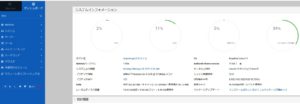
いい感じですね。

———————-

OS SD of raspberry Pi 2+ is damaged! Rebuild! Introduce samba.
Since it is a NAS at home, first install samba
From the command screen
sudo apt-get install -y samba

This completes
Too early!
However, since I want to operate it as a server, I also introduced webmin
This is a little annoying
First install the required libraries

sudo apt-get -y install libnet-ssleay-perl openssl libauthen-pam-perl libio-pty-perl apt-show-versions –fix-broken
sudo apt –fix-broken install

install
wget https://prdownloads.sourceforge.net/webadmin/webmin_1.984_all.deb
sudo dpkg -i ./webmin_1.970_all.deb

This completes
After that, the GUI will be stopped at startup, so
Configuration config
System sysytem
Boot boot
Select CLI and OK
Shut down and move the NAS drive and raspberry to the internal network.
There are two internal and external units at home, and it is troublesome to set up the internet due to internal damage, so I temporarily moved to the outside.
I set the OS and put it back.
"SnapCrab_NoName_2022-2-"

it is a good feeling

———————-
———————-

Raspberry Pi 2+ OS SD ist beschädigt! Wiederaufbau! Samba einführen.
Weil es NAS zu Hause ist, installieren Sie zuerst Samba
Vom Befehlsbildschirm
sudo apt-get install -y samba

Das abschließt
Zu früh!
Da ich jedoch als Server tätigen möchte, führen wir auch Webmin ein
Das ist ein bisschen Überstunden
Installieren Sie die erforderliche Bibliothek am Anfang

sudo apt-get -y install libnet-ssleay-perl openssl libauthen-pam-perl libio-pty-perl apt-show-versions –fix-deck
Sudo APT -FIX-BROCK INSTALLIERT

Installieren
wget https://prdownloads.sourceforge.net/webadmin/webmin_1.984_all.deb.
sudo dpkg -i ./webmin_1.970_all.deb

Das abschließt
Danach, weil Sie mit der GUI beim Start aufhören
Konfiguration Config
System SYSYTEM.
Bootstiefel
Wählen Sie CLI und OK
Wenn Sie das NAS-Laufwerk und die Himbeere in das interne Netzwerk in das Herunterfahren in OK verschieben
Zu Hause gibt es zwei interne, äußere Schäden, und die Nettoeinstellung ist mühsam, so dass es vorübergehend nach außen bewegt wird
Das Betriebssystem wurde eingestellt und zurückgegeben.
"snapcrab_noname_2022-2-

Es ist ein gutes Gefühl

———————-
———————-

L’OS SD du raspberry Pi 2+ est endommagé ! Reconstruire ! Introduire la samba.
Puisqu’il s’agit d’un NAS à la maison, installez d’abord samba
Depuis l’écran de commande
sudo apt-get install -y samba

Ceci complète
Trop tôt!
Cependant, puisque je veux l’exploiter en tant que serveur, j’ai également introduit webmin
C’est un peu gênant
Installez d’abord les bibliothèques requises

sudo apt-get -y install libnet-ssleay-perl openssl libauthen-pam-perl libio-pty-perl apt-show-versions –fix-broken
sudo apt –fix-broken install

installer
wget https://prdownloads.sourceforge.net/webadmin/webmin_1.984_all.deb
sudo dpkg -i ./webmin_1.970_all.deb

Ceci complète
Après cela, l’interface graphique sera arrêtée au démarrage, donc
Configuration de la configuration
système système
Démarrage démarrage
Sélectionnez CLI et OK
Arrêtez et déplacez le lecteur NAS et la framboise vers le réseau interne.
Il y a deux unités internes et externes à la maison, et il est difficile de configurer Internet en raison de dommages internes, j’ai donc temporairement déménagé à l’extérieur.
J’ai configuré le système d’exploitation et je l’ai remis en place.
"SnapCrab_NoName_2022-2-

C’est un sentiment agréable

———————-