「OS」タグアーカイブ

raspberry Pi 2+のOS SDが破損!再構築! samba、webminを導入:OS SD of raspberry Pi 2+ is damaged! Rebuilt! Introduced samba and webmin

raspberry Pi 2+のOS SDが破損!再構築! samba、webminを導入
自宅のNASなので、まずはsambaをインストール
sd card の容量はこの程度
16GB程度でOK
8GBだと、ギリギリ

コマンド画面から
sudo apt-get install -y samba

これで完了
早すぎ!
但し、サーバとして稼働させたいので、webminも導入
これは少々面倒
初めに必要なライブラリをインストール

sudo apt-get -y install libnet-ssleay-perl openssl libauthen-pam-perl libio-pty-perl apt-show-versions –fix-broken
sudo apt –fix-broken install

インストール
wget https://prdownloads.sourceforge.net/webadmin/webmin_1.984_all.deb
sudo dpkg -i ./webmin_1.970_all.deb

これで完了
後は、起動時にGUIをやめるので
設定 config
システム sysytem
ブート boot
CLI を選択してOK
シャットダウンで、NASドライブとraspberry を内部ネットワークへ移動すればOK
自宅のは、内部、外部2台あり内部の破損で、ネットの設定面倒なので一時的に外部へ移動
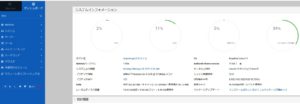
OSを設定して戻した。
SnapCrab_NoName_2022-2-20_3-36-6_No-00

いい感じですね。

———————-

OS SD of raspberry Pi 2+ is damaged! Rebuild! Introduce samba.
Since it is a NAS at home, first install samba
From the command screen
sudo apt-get install -y samba

This completes
Too early!
However, since I want to operate it as a server, I also introduced webmin
This is a little annoying
First install the required libraries

sudo apt-get -y install libnet-ssleay-perl openssl libauthen-pam-perl libio-pty-perl apt-show-versions –fix-broken
sudo apt –fix-broken install

install
wget https://prdownloads.sourceforge.net/webadmin/webmin_1.984_all.deb
sudo dpkg -i ./webmin_1.970_all.deb

This completes
After that, the GUI will be stopped at startup, so
Configuration config
System sysytem
Boot boot
Select CLI and OK
Shut down and move the NAS drive and raspberry to the internal network.
There are two internal and external units at home, and it is troublesome to set up the internet due to internal damage, so I temporarily moved to the outside.
I set the OS and put it back.
"SnapCrab_NoName_2022-2-"

it is a good feeling

———————-
———————-

Raspberry Pi 2+ OS SD ist beschädigt! Wiederaufbau! Samba einführen.
Weil es NAS zu Hause ist, installieren Sie zuerst Samba
Vom Befehlsbildschirm
sudo apt-get install -y samba

Das abschließt
Zu früh!
Da ich jedoch als Server tätigen möchte, führen wir auch Webmin ein
Das ist ein bisschen Überstunden
Installieren Sie die erforderliche Bibliothek am Anfang

sudo apt-get -y install libnet-ssleay-perl openssl libauthen-pam-perl libio-pty-perl apt-show-versions –fix-deck
Sudo APT -FIX-BROCK INSTALLIERT

Installieren
wget https://prdownloads.sourceforge.net/webadmin/webmin_1.984_all.deb.
sudo dpkg -i ./webmin_1.970_all.deb

Das abschließt
Danach, weil Sie mit der GUI beim Start aufhören
Konfiguration Config
System SYSYTEM.
Bootstiefel
Wählen Sie CLI und OK
Wenn Sie das NAS-Laufwerk und die Himbeere in das interne Netzwerk in das Herunterfahren in OK verschieben
Zu Hause gibt es zwei interne, äußere Schäden, und die Nettoeinstellung ist mühsam, so dass es vorübergehend nach außen bewegt wird
Das Betriebssystem wurde eingestellt und zurückgegeben.
"snapcrab_noname_2022-2-

Es ist ein gutes Gefühl

———————-
———————-

L’OS SD du raspberry Pi 2+ est endommagé ! Reconstruire ! Introduire la samba.
Puisqu’il s’agit d’un NAS à la maison, installez d’abord samba
Depuis l’écran de commande
sudo apt-get install -y samba

Ceci complète
Trop tôt!
Cependant, puisque je veux l’exploiter en tant que serveur, j’ai également introduit webmin
C’est un peu gênant
Installez d’abord les bibliothèques requises

sudo apt-get -y install libnet-ssleay-perl openssl libauthen-pam-perl libio-pty-perl apt-show-versions –fix-broken
sudo apt –fix-broken install

installer
wget https://prdownloads.sourceforge.net/webadmin/webmin_1.984_all.deb
sudo dpkg -i ./webmin_1.970_all.deb

Ceci complète
Après cela, l’interface graphique sera arrêtée au démarrage, donc
Configuration de la configuration
système système
Démarrage démarrage
Sélectionnez CLI et OK
Arrêtez et déplacez le lecteur NAS et la framboise vers le réseau interne.
Il y a deux unités internes et externes à la maison, et il est difficile de configurer Internet en raison de dommages internes, j’ai donc temporairement déménagé à l’extérieur.
J’ai configuré le système d’exploitation et je l’ai remis en place.
"SnapCrab_NoName_2022-2-

C’est un sentiment agréable

———————-

広告対策で、ブラウザをfirefoxアドイン追加、OS、CCleanerを排除の結果:As a result of adding firefox add-in to the browser and eliminating OS and CCleaner as an anti-advertising measure

広告対策で、ブラウザをfirefoxアドイン追加、OS、CCleanerを排除の結果
NoName_2021082911313700
数秒毎に、8kbps程度の通信があるだけ
そのため、ヤフーと閲覧すると4Mbpsを0.3秒ほどで閲覧できた。
ちなみに、
ヤフーと閲覧
Firefoxでアドインでは
8Mbpsで0.3秒かかります
Firefoxは、ほぼ通信が終了して不要な通信は行われていません。
しかし、OS標準のMicros〇ft Edgeは、悪意ですね。
Micr〇soft Edgeでは
35Mbpsで3秒かかります
その上、接続してから、Micro〇oft Edgeはバックで24kbpsが常に発生します。
要は、世界の省資源化に逆行しているという事ですね。
これだけの電気量やパケットを、不要に消耗しているかと思うと残念ですね。

As a result of adding firefox add-in to the browser and eliminating OS and CCleaner as an anti-advertising measure

There is only communication of about 8kbps every few seconds
Therefore, when browsing with Yahoo, I was able to browse 4Mbps in about 0.3 seconds.
by the way,
Browse with Yahoo
Add-ins in Firefox
It takes 0.3 seconds at 8Mbps
In Firefox, communication is almost finished and unnecessary communication is not performed.
However, the OS standard Micros 〇 ft Edge is malicious.
In Micr 〇 soft Edge
It takes 3 seconds at 35Mbps
Besides, after connecting, Micro 〇 oft Edge always generates 24kbps in the back.
The point is that it goes against the saving of resources in the world.
It’s a shame to think that this amount of electricity and packets are being consumed unnecessarily.

由於在瀏覽器中添加了 firefox 插件並取消了 OS 和 CCleaner 作為反廣告措施

每隔幾秒只有大約 8kbps 的通信
因此,在使用雅虎瀏覽時,我能夠在大約 0.3 秒內瀏覽 4Mbps。
順便一提,
使用雅虎瀏覽
Firefox 中的插件
8Mbps 需要 0.3 秒
在 Firefox 中,通信幾乎完成,並且不會執行不必要的通信。
但是,操作系統標準 Micros 〇 ft Edge 是惡意的。
In Micr 〇軟邊
35Mbps需要3秒
此外,連接後,Micro 〇 oft Edge 總是在後面產生 24kbps。
關鍵是它與世界上的資源節約背道而馳。
認為不必要地消耗瞭如此大量的電力和數據包,真是令人遺憾。

Als Ergebnis des Hinzufügens des Firefox-Add-Ins zum Browser und des Eliminierens von OS und CCleaner als Anti-Werbe-Maßnahme

Es gibt nur alle paar Sekunden eine Kommunikation von etwa 8kbps
Daher konnte ich beim Surfen mit Yahoo 4 Mbit / s in etwa 0,3 Sekunden durchsuchen.
übrigens,
Browsen mit Yahoo
Add-Ins in Firefox
Es dauert 0,3 Sekunden bei 8 Mbit/s
In Firefox ist die Kommunikation fast abgeschlossen und unnötige Kommunikation wird nicht durchgeführt.
Der Betriebssystemstandard Micros ft Edge ist jedoch bösartig.
In Micr weicher Rand
Es dauert 3 Sekunden bei 35 Mbit/s
Außerdem generiert Micro 〇 oft Edge nach dem Verbinden immer 24 kbps auf der Rückseite.
Der Punkt ist, dass es der Einsparung von Ressourcen in der Welt zuwiderläuft.
Es ist eine Schande zu denken, dass diese Menge an Strom und Paketen unnötig verbraucht wird.

En raison de l’ajout du complément firefox au navigateur et de l’élimination du système d’exploitation et de CCleaner en tant que mesure anti-publicité

Il n’y a qu’une communication d’environ 8kbps toutes les quelques secondes
Par conséquent, lors de la navigation avec Yahoo, j’ai pu parcourir 4 Mbps en environ 0,3 seconde.
d’ailleurs,
Naviguer avec Yahoo
Compléments dans Firefox
Cela prend 0,3 seconde à 8 Mbps
Dans Firefox, la communication est presque terminée et aucune communication inutile n’est effectuée.
Cependant, la norme du système d’exploitation Micros 〇 ft Edge est malveillante.
En micro bord doux
Cela prend 3 secondes à 35 Mbps
De plus, après connexion, Micro 〇 oft Edge génère toujours 24kbps à l’arrière.
Le fait est que cela va à l’encontre de l’économie des ressources dans le monde.
C’est dommage de penser que cette quantité d’électricité et de paquets sont consommés inutilement.

結局、今のご時世、どれだけ不要なパケットを駆除できるかが
ブラウザの真意ですね。
androidも適応できるFirefox
アドインが無ければ対して比較になりませんが、
駆除アドインがある限り、Firefoxは無敵ですね。
早いとか遅いとかは、ブラウザは関係が無いと思います

After all, how many unnecessary packets can be removed in this age
That’s the true meaning of the browser.
Firefox that can also adapt to android
If you don’t have an add-in, you won’t be able to compare it,
Firefox is invincible as long as you have a disinfection add-in.
I don’t think the browser has anything to do with whether it’s fast or slow.

Denn wie viele unnötige Pakete können in diesem Zeitalter entfernt werden
Das ist die wahre Bedeutung des Browsers.
Firefox, der sich auch an Android anpassen kann
Wenn Sie kein Add-In haben, können Sie es nicht vergleichen.
Firefox ist unbesiegbar, solange Sie ein Desinfektions-Add-In haben.
Ich glaube nicht, dass der Browser etwas damit zu tun hat, ob er schnell oder langsam ist.

Après tout, combien de paquets inutiles peuvent être supprimés à cet âge
C’est le vrai sens du navigateur.
Firefox qui peut aussi s’adapter à android
Si vous n’avez pas de complément, vous ne pourrez pas le comparer,
Firefox est invincible tant que vous disposez d’un complément de désinfection.
Je ne pense pas que le navigateur ait quelque chose à voir avec le fait qu’il soit rapide ou lent.