
Windows10:1903で障害、電源を入れると一度電源が落ちる?
対策
1903に更新してようやく解決。
何が問題だったか
シャットダウン前のCPU・メモリなどのデバイスの状態を保存することで、
次回起動時に高速にスタートアップ
デフォルトでは高速スタートアップが有効になっています。
シャットダウン時の正常なシャットダウンが行われないから起きた
要は、バックグランドで動作している各種のアプリ更新など
強制的に動作させる面倒なソフトが起因により1903以降、
正常なシャットダウンができない状態に。
そこで対処方法は、この高速スタートアップを無効にすれば良いだけです。
SSDを利用しているのであれば時間に差は生まれません。
HDDでは、各種ソフトやドライバーが対応されるまで我慢です。
In Windows10: 1903, when the power is turned on, the power goes down once.
Measures
Updated to 1903 and finally solved.
What was the problem
By saving the state of devices such as CPU and memory before shutdown,
Fast startup at next startup
By default, fast startup is enabled.
Occurs because normal shutdown is not performed at shutdown
In short, updating various apps running in the background
After 1903 due to troublesome software to forcibly operate,
A state where normal shutdown is not possible.
The only workaround is to disable this fast startup.
If you use SSD, there will be no time difference.
With HDD, we are patient until various software and drivers are supported.
検索に
電源オプション
といれます。
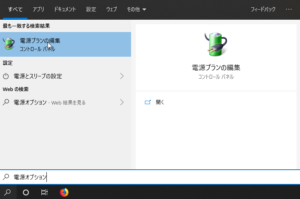
To search
Power options
It can be said.
表示したいのは、電源オプションなので、電源オプションをクリックします。
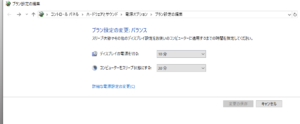
Since you want to view the power options, click the power options.
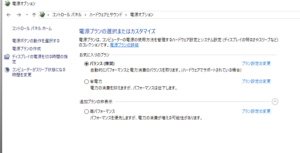
右の「電源ボタンの動作を選択する」をクリック
Click “Select power button action” on the right
現在利用可能でない設定を変更します
Change settings that are not currently available
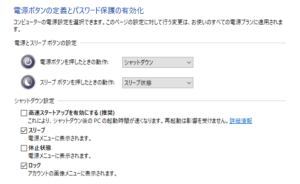
これを、チェックするかどうかです。
チェックを外すと問題なく起動します。
バッチファイルでもどうにかなりますが、使い方
覚えていたほうが、何かと便利です。
Whether to check this.
If you remove the check, it will start without problems.
It’s pretty much a batch file, but how to use
It ’s more convenient to remember.
機器を永続的な利用を考慮していないので
ある程度、推奨されていない機器を使う人は
ある意味、自分でも知識を蓄えたほうが無難。
Because the device is not considered for permanent use
To some extent, people who use devices that are not recommended
In a sense, it is safer to accumulate knowledge yourself.