
ここまで来たら何かあるだろう!
おおありました。
ここは、こだわりがあるかと思うが、ノートなど14-17インチ程度の画面だと
au_odeskなどの嫌がらせの様な、UIのフォント画面いっぱいに広がる操作パネルや警告表示!
何処から見ても、数回なら良いが、1年間見るとありえない迷惑な強要!
※今でもイラつくが・・。作業の10%はこれで遅延する。なぜ何処まで購入側が責任をau_odeskに負わせるのだろうかと
思うと残念なばかりだ。
しかしそれは全く無いようだ。

If you come this far, there will be something!
I was there.
I think that there is a commitment here, but it is a screen of about 14-17 inches such as notebooks
Operation panel and warning display that spread over the UI font screen like harassment such as au_odesk!
No matter where you look, it’s good to be a few times, but you can’t do it for one year!
※ I’m still irritated … This delays 10% of the work. Why is the purchaser responsible to au_odesk?
I’m sorry to think.
But it doesn’t seem to be at all.
オープンソースで良かったと思う点はこれ!
常に操作方法や快適ツールなどは変更されるが、
習得者(スキル)を、常に待ってくれる存在。
入り口は、底辺からで問題無い。
販売形態の持つサブスクリプションは、
基本的にスキル習得は、年期限!
遅れた既存スキル者は、上乗せされるか捨て置かれる。
持続利用もできない。
入り口は、常にハードスキルと寛容でない。
This is what I like about open source!
Although the operation method and comfortable tools are always changed,
A person who always waits for learners (skills).
There is no problem at the entrance from the bottom.
The subscription that the sales form has is
Basically, skill acquisition is for a year!
Existing skills that are late will be added or abandoned.
It cannot be used continuously.
The entrance is not always hard skills and tolerance.
ここに統一されている。
It is unified here.
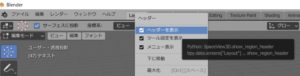
右クリックによって
3つの表示形態を操作できる。
ヘッター
ツール
メニュー
下から順にチェックを外せばわかるはず。
ヘッターメニュは最後にしよう。
これは焦るから (^^)>
ヘッターは、ウィンドウの右端に三角が出るのでこれを下に引っ張り出す感覚で
操作すればいい。
By right clicking
Three display modes can be operated.
Hetter
tool
menu
If you remove the check in order from the bottom, you will understand.
Let’s finish the Hetter menu last.
Because this is impatient (^^)>
Hetter has a triangle at the right end of the window, so pull it down
Just operate.