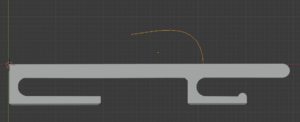
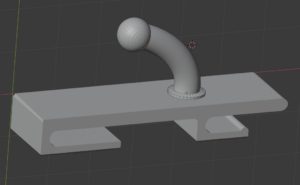
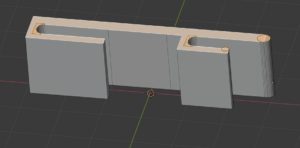
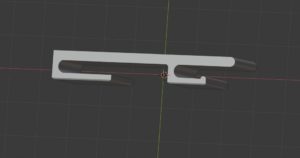
まず名前を付けて面を削除
頂点だけ残る。
任意に、頂点を作成する事から始める。
Name and delete face first
Only the top remains.
Optionally, start by creating vertices.
友人に言われたが、何故に意に反してFUSION 360を使わないと。
簡単話、ベンダー製品は、初めのうちは良い。
しかし、1年後にお金と時間と操作難解を強要するから無駄である。
何よりも、OSの別離、操作方法の差別化は最も愚弄手法。
企業で使うならそれでよいが、コスト面を考慮に入れても、クラウドの時代
販売ベンダーが、サブスクリプションやサブスクライブ求めた時点で方向を決めなくてはならない。
最新手法で操作方法が変化するなら差し支えない。
何も変わっていないのに、販売ベンダーの巨大なリソースを、維持するために、
サブスクリプションやサブスクライブを強要するなら不要ベンダーだろう。
なぜなら、多かれ、少なかれ廃れる。
その点、blenderは、マルチOSでオープンソースで、極小ユーザの寄付は求めていない
(^^> 寄付しようと思ったら入り口が企業だらけだった。
これこそクラウド時代のソフトと言える。
My friend told me that I had to use FUSION 360 contrary to my wishes.
In short, vendor products are good at first.
However, it is useless because it requires money, time, and operational difficulties one year later.
Above all, separating the OS and differentiating the operation method are the most ridiculous methods.
That’s fine for corporate use, but the cost of the cloud era
When a vendor asks for a subscription or subscription, it must decide where to go.
If the operation method changes with the latest method, it does not matter.
To maintain the huge resources of the sales vendor, even if nothing has changed,
If you’re forcing subscriptions and subscribing, you probably won’t.
Because more or less will go away.
In that regard, blender is open source with multi-OS and does not require donation of very small users
(^^> Entrance was full of companies when I wanted to donate.
This is the software of the cloud era.
これも方眼を作るサイトが助かる。
http://houganshi.net/houganshi_solid.php
これも方眼を作るサイトが助かる。
とりあえず、大まかな設計図を起こしてみた。
For the time being, I made a rough design drawing.
ノギス
Caliper
で寸法を測る。
定規より便利。
で寸法を測る。
定規より便利。
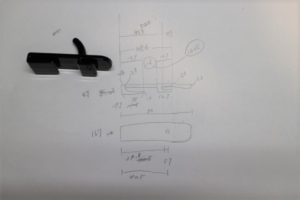
この形状は簡単だ
操作方法は、ちょっと難しかった。
慣れるまで大変
頂点を任意に追加する。
面で残った頂点を移動しても良い。
自分は、あとでその点を消すようにして任意に追加する。
頂点の追加方法は、
必ず
編集モード
そして
CTRL+右クリックだ、よくLMBとか表示されているが全く難しい。
操作方法に、略は自分に地獄だった。(^^)>
何を意図としているのかわからんから
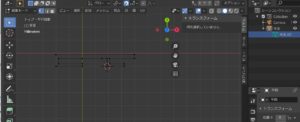
This shape is easy
The operation method was a little difficult.
It’s hard to get used to
Add vertices arbitrarily.
The vertices remaining on the surface may be moved.
I add it arbitrarily so as to erase that point later.
To add a vertex,
you have to
Edit mode
And
CTRL + Right click, LMB is often displayed, but it is quite difficult.
Abbreviation was hell to myself in how to operate.(^^)>
I don’t know what I mean
右クリックを押すとこのオブジェクトの最後の頂点から連続線が作られ、頂点も追加される。
これは、あまり気にしないで背景のグリッドを数えて点を追加する。
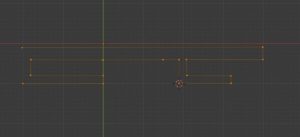
Pressing right-click creates a continuous line from the last vertex of this object and adds the vertex.
This adds a point, counting the background grid without much concern.
これでほぼ完成。
忘れてた余計な頂点は、選択して削除
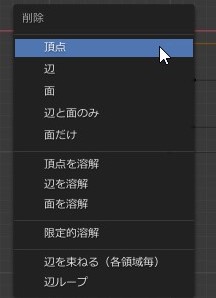
Almost complete with this.
Select and delete unnecessary vertices
選択して右クリック
頂点からの新規辺・面をクリックで面が生成された
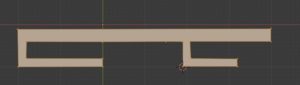
Select and right-click
A face is generated by clicking a new edge / face from a vertex
これであとは微調整すればいいだけ。
You just need to fine-tune it.