ざっくり路線を計算して地形の縦横断は簡便に作成可能、多分 2分ぐらいで100測点程
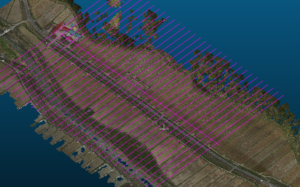
自動で図面を作れるだが、・・
地形は、地形フィルタは独自のフィルタを使いたい場合の対応
路線は、いつもの通りだが、ここからが違う
Roughly vertical cross terrain to calculate the route is easily can be created, as perhaps 100 measurement points in about 2 minutes
It is possible to create drawings automatically, but …
Terrain, Terrain filter handling when you want to use your own filter
Routes are as usual, but different from here
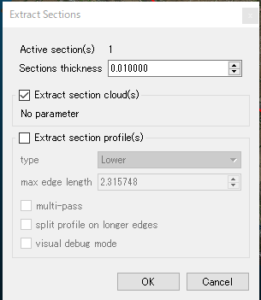
やっぱり点群なのだから、点群で応用すべき
ここもこのソフトの素晴らしい事
何かという言うと点群重心計算みたいな?
なのかな?
Because after all the point cloud, it should be applied in the point cloud
Here also nice thing of this software
Like a something say that if the point group center of gravity calculation?
Is not it?
起点から進む方向に、進んで周辺のセグメントから位置を算出
要は、全体の間引きセグメントで無くリアル構成点からなので、例えば別途3Dレーザの点マージも利用できるって事だと思う。
これで計算したデータは、生点クラウドで出てくるので後は、ascll 出力
In the direction going from the starting point, willing calculates the position from the vicinity of the segment
In short, since it is not a whole thinning segment but a real construction point, I think that it is possible to use point merging of 3D laser separately, for example.
Since the data calculated by this will come out in the raw cloud, after that, ascll output

空間系の精度のみで、間引く必要なし。
Only with the accuracy of the space system, there is no need to thin out.
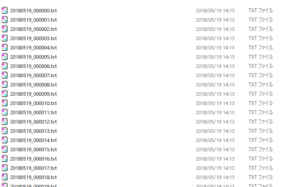
ここまでくれば、後は簡単!
起点から終点まで1測点 500-1100点の構成点
出力されるのは、X,Y,Z,R,G,B,PointSourceId,ScanDirectionFlag,Intensity
ね、これ重要
位置とLASの内容そのまま 色構成と強度が付属 利用価値半端ないですね。
If me up to this point, it is easy after!
Configuration point of 1 stations 500-1100 points from the start point to the end point
It outputs X, Y, Z, R, G, B, PointSourceId, ScanDirectionFlag, Intensity
Right, this important
It is the content as it is the color configuration and the intensity of the position and the LAS is not odd comes with use value.
独自フィルタでざっくり間引くと1測点当たり 3秒ほど
100測線で15分ほどですべて完了
すべて、GMLかKML、DXFで吐き出すか、縦横断シーマまで出力できる。
道路上の作工物や埋設物(パイプクラウドをマージング等)でざっくりできます。
Roughly thinned out with its own filter and about 3 seconds per measurement point
Completed in about 15 minutes at 100 survey line
All spit out with GML or KML, DXF,
Vertical transverse seama It can output up to original specifications of Japan.
Waterway objects on the road, concrete crops and
Materials to be buried (pipe cloud merging etc.)
It is created in.
高価なソフトの高価なフィルタは地域性を持たないのが
パラメータで設定するが、概念的にソリッドやメッシュ
この形態で利用できるのは、面構成のみと思うけど
Expensive filter of expensive software that does not have the regional characteristics
It is set by parameters, but conceptually a solid or a mesh
I think that only surface configuration can be used in this form
独自のパラメータは簡単!
測深方向の色や高さ、移動量で残す、残さない、同様な移動量は間引くのみ
路線付近から、決まった付近の形状は重要で有れば間引きを無効にするってな感じです。
路線方向から、決まった距離は、前後の点から重心計算して新たに挿入する、計画フィールドは同じように付与すれば完了
の程度なら、複雑で高度なフィルタを利用するより、誰でもできるって事でした。
検査も簡単です。
Own parameters is easy!
Sounding direction of color or height, leaving in the movement amount, does not leave, similar movement amount thins only
From the vicinity of the route, if the shape near the fixed is important, thinning out is invalid
From the route direction, fixed distance,
Newly inserted and centroid calculation in terms of the front and rear, plan field completed if applied in the same way
, It was that anyone could do it rather than using complex and sophisticated filters.
The inspection is also easy.
これを、再度点群にしたり、すべて2次元であるので計算要素が単純
This is made again as a point cloud or since all are two-dimensional, calculation elements are simple
複雑にするほうが、時間の資源の浪費ですね。
It is a waste of time resources to make it complicated.
昔、civilで計算してLandxmlを作成した当時、100日ぐらいかかった事を覚えています。
路線数も数えきれないが、これだと多分5日ぐらいかも
気のせいですね。”(-“”-)”
Once upon a time, at the time you create a Landxml calculated on civil,
I remember taking about 100 days.
I can not count the number of routes, perhaps it is about 5 days or so
It is due to mind. ”(-“”-)”