
フィラメントは、結構固い
ここに挿入する場合は、面倒だ
そこでだ、挿入時に真鍮ギアに少し寄せながら入れる。

これで挿入されれば後は、止まるまで差し込む
余熱PLA

そして、ノズル温度を200度に設定

出てきたらOK クールダウンを実行して準備完了。
「ender3d」カテゴリーアーカイブ
Ender-3d:設定の解説
よーし準備だ
まずは、メニューを読み取ろう!
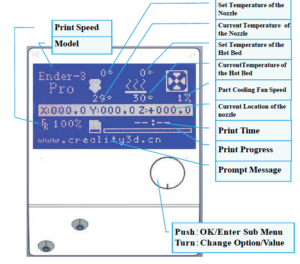
Alright.
First, read the menu!
メインメニュー
これは、そのままの通り
で、メニューから見る解説はこれだ

Main menu
This is exactly as
And here is the explanation from the menu
マニュアルを見ると結構違う
Ender-3d:ファームウェアをチェック
組み立て終了
で、実機の確認
おお起動した

End of assembly
Then check the actual machine
Oh started
バージョンの確認

Check version
Latest Firmware: Ender-3 Pro 1.1.6.2
https://creality.com/download/firmware_c0008
とりあえず合致している。
素晴らしいことは、モジュールで構成されている事ですね。
これだと日本語でも、もしかしたら
シリアルで動作しているので、ESPモジュールのwifiで
無線通信でもコントロールできるだろう。

For the time being they match.
The great thing is that it is made up of modules.
If this is Japanese, maybe
Since it operates in serial, it is possible to use ESP module wifi
It could be controlled by wireless communication.