
非常に安価な状況で、スマートホームを実現できている環境で
次に、主にボイラーを操作したい!
そこで、ボットの自作だねという事で、現状!
アレクサ、グーグルホームも、RS-WFIREX3 で反応も良い。
ただし、音声の操作は、イマイチだ。
これは、今でも同じ、同様。
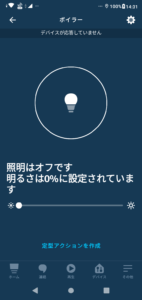
これ、照明と認識されている。
探したら文字化け状態。
In an environment where a smart home can be realized in a very inexpensive situation
Next, I mainly want to operate the boiler!
So, it’s a bot’s own work, so the current situation!
Alexa and Google Nest are also responsive with RS-WFIREX3.
However, voice operation is not good.
This is still the same, the same.
This is recognized as lighting.
If you look for it, the characters are garbled.
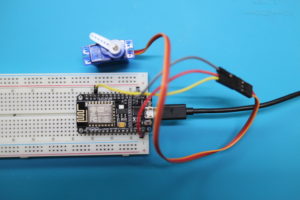
用意するものは、どこにでもあるESP 32
自分は、とりあえず動作するかどうか確かめるために一時的な製品
テストESP32モジュール。
注意ですが、D1の電力5V 3.3Vも安定的に供給されないので
モジュールに、Vin等記載は、電力スルーですね。
それ以外は、チップから分岐しているのでモータのような持続電流には不向きですね。
きっと
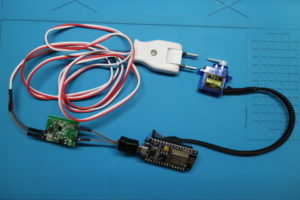
小型サーボ
ac dc モジュール
What to prepare is ESP 32, which is everywhere
I’m a temporary product to see if it works for the time being
Test ESP32 module.
Please note that the power of D1 5V 3.3V is not supplied stably.
The description of Vin etc. on the module is power through.
Other than that, it is not suitable for continuous current like a motor because it is branched from the chip.
surely
利用して作成しました。
使い続けるには、技適等を考える必要があるので注意です。
I created it using it.
Please note that you need to consider technical suitability to continue using it.
必要なライブラリは、標準以外はこれ
https://github.com/simap/fauxmoesp
https://github.com/me-no-dev/ESPAsyncTCP
Required libraries are non-standard
ソースは、これで動作しました。
The source now works.
#include
#include
#include “fauxmoESP.h”
#include
Servo myservo;
int servoIni = 0;
int servoOn = 55;
int servoState = 0;
int flag = 0;
#define WIFI_SSID “WIFIのSSD”
#define WIFI_PASS “WIFIのSパスワード”
fauxmoESP fauxmo;
// —————————————————————————–
#define SERIAL_BAUDRATE 115200
#define ID “ボイラー”
// —————————————————————————–
// —————————————————————————–
// Wifi
// —————————————————————————–
void wifiSetup() {
// Set WIFI module to STA mode
WiFi.mode(WIFI_STA);
// Connect
Serial.printf(“[WIFI] Connecting to %s “, WIFI_SSID);
WiFi.begin(WIFI_SSID, WIFI_PASS);
// Wait
while (WiFi.status() != WL_CONNECTED) {
Serial.print(“.”);
delay(100);
}
Serial.println();
// Connected!
Serial.printf(“[WIFI] STATION Mode, SSID: %s, IP address: %s\n”, WiFi.SSID().c_str(), WiFi.localIP().toString().c_str());
}
void setup() {
// Init serial port and clean garbage
Serial.begin(SERIAL_BAUDRATE);
Serial.println();
Serial.println();
// Wifi
wifiSetup();
// By default, fauxmoESP creates it’s own webserver on the defined port
// The TCP port must be 80 for gen3 devices (default is 1901)
// This has to be done before the call to enable()
fauxmo.createServer(true); // not needed, this is the default value
fauxmo.setPort(80); // This is required for gen3 devices
// You have to call enable(true) once you have a WiFi connection
// You can enable or disable the library at any moment
// Disabling it will prevent the devices from being discovered and switched
fauxmo.enable(true);
// Add virtual devices
fauxmo.addDevice(ID);
fauxmo.onSetState([](unsigned char device_id, const char * device_name, bool state, unsigned char value) {
Serial.printf(“[MAIN] Device #%d (%s) state: %s value: %d\n”, device_id, device_name, state ? “ON” : “OFF”, value);
// Checking for device_id is simpler if you are certain about the order they are loaded and it does not change.
// Otherwise comparing the device_name is safer.
if (strcmp(device_name, ID)==0) {
if(state){
flag = 1;
}else{
flag = 2;
}
}
});
}
void loop() {
// fauxmoESP uses an async TCP server but a sync UDP server
// Therefore, we have to manually poll for UDP packets
fauxmo.handle();
if(flag == 1){
livingOn();
flag = 0;
}else if(flag == 2){
livingOff();
flag = 0;
}
}
void livingOn() {
myservo.attach(4);
delay(1000);
myservo.write(servoOn);
delay(1000);
myservo.write(servoIni);
delay(1000);
myservo.detach();
Serial.print(“Switch turn on …”);
}
void livingOff() {
myservo.attach(4);
delay(1000);
myservo.write(servoOn);
delay(1000);
myservo.write(servoIni);
delay(1000);
myservo.detach();
Serial.print(“Switch turn off …”);
}
認識されるとアレクサでは、文字化けします。
UTF-8 BOM?なのか化けますが、最終的にアレクサで名前を変えると動作します。
レスポンスは非常に早いです。
RS-WFIREX3ので照明、テレビ、エアコン等名前変更の認識は20%の状態ですが
このESPボットの認識は、50回試しましたが誤動作無しです。
クラウドで動作しない分ローカルネットワークでの認識は非常に高速です。
RS-WFIREX3のでなく、ネット―ワークを抜けるパケットの長さが起因ですね。
クラウドでの操作は、すべてエンコードの煩雑なやり取り、ローカルは、ほぼTCPでのやり取りができるので
遅延とエンコードエラーが無い。
When it is recognized, it will be garbled in Alexa.
It’s garbled as UTF-8 BOM ?, but it works when you finally change the name with Alexa.
The response is very fast.
Since RS-WFIREX3, the recognition of name changes such as lighting, TV, air conditioner, etc. is 20%.
I have tried 50 times to recognize this ESP bot, but there is no malfunction.
Recognition on the local network is very fast because it does not work in the cloud.
It’s not because of RS-WFIREX3, but because of the length of the packet that goes through the network.
All operations in the cloud are complicated encoding exchanges, and local exchanges are almost TCP.
No delays and no encoding errors.

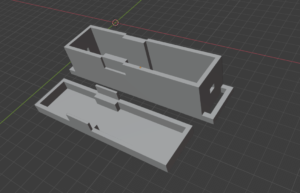
ケースの作成
とりあえず完成!
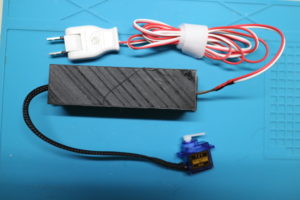
結構良い感じですね。

接着は、セリアの物で接着。
事前に、ボイラー部の油分をできるだけ取り去る。!
自分は、初めからビニールの保護被膜を取り去っていなかったので問題ない
押すタイミング、離すタイミングもばっちりです。

1月間ほどなく実験してみて問題無ければ、夜中だけでも電力を落とすために非侵襲的 AC電流センサ
で制御を考えた。
自作でも良いのだが、筐体を考えると市販が割安