
ヤフーのSNS認証が届かなくて恐怖した!
I was scared that Yahoo’s SNS certification did not arrive!
我很害怕Yahoo的SNS認證還沒到!
雨が降って端子に数滴入った
仕事中に、スマートフォンが突如故障!
It rained and a few drops entered the terminal
My smartphone suddenly broke down during work!
下著雨,幾滴水進入航站樓
我的智能手機在工作期間突然壞了!
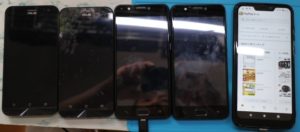
ただそれだけだ。この現象すでに4台目
But that’s it. This phenomenon is already the 4th
就是這樣。這種現像已經是第四
サービス曰く、原因が不明なので修理、最低で1万ほどと使えない期間が1-2週間考えると
アホらしく思って再度数台用意している。
According to the service, the cause is unknown, so repair, at least 10,000 and the period of unavailability is 1-2 weeks
I think it’s stupid and prepare several units again.
根據服務,原因不明,因此需要修理,至少10,000,並且無法使用的時間為1-2週
我認為這很愚蠢,需要再準備幾個單元。
※zenfone のOS 8以降だったと思う。
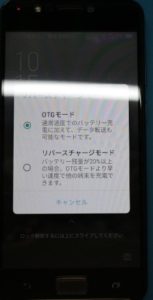
リバースチャージモード以前は、停止する事ができたのだが今は通常でONモードしかない。
本当に不要だよねーて思う。故障の頻度を上昇するだけだから。
その上、この点滅、キャンセルは一切機能しない。
多分、ケーブルによって判断されるべきモードだろうけど
このリバースチャージが点滅して一生だめ。
面白いよね。キャンセル押したらデフォルトだからOTGモードの選択となると思う。
しかし、電圧が流れているから違うでしょ!?という事で再度選択を迫られる。
これ考えてもおかしいよね。
リバースチャージモードしかないって事。
それを選択しても、ケーブルがリバースチャージモード用でないのでやっぱり選択を進める。
全くおかしい機能でした。
本当にやめてほしい。ON OFFの機能が相当なのにね。
自動にする意味がない。
通電の電圧で判断されていると思うのでしっかりとした保護回路も無いと思う。
これ自分的には昔に戻してほしい感が常にある。
zenfone系の大容量が搭載しているものは注意です。
というか考えたほうがいいですね。
* I think it was OS 8 or later of zenfone.
Before the reverse charge mode, it was possible to stop it, but now it is normal and there is only ON mode.
I think it’s really unnecessary. It only increases the frequency of failures.
Besides, this blinking and canceling doesn’t work at all.
Probably the mode that should be judged by the cable
This reverse charge flashes and you can’t do it for the rest of your life.
It’s interesting. If you press Cancel, it’s the default, so I think you’ll be selecting OTG mode.
However, it is different because the voltage is flowing! ?? So I have to make a choice again.
It’s strange to think about this.
There is only reverse charge mode.
Even if you select it, the cable is not for reverse charge mode, so proceed with the selection.
It was a completely strange feature.
I really want you to stop. The ON / OFF function is considerable.
There is no point in making it automatic.
I think that it is judged by the energizing voltage, so I don’t think there is a solid protection circuit.
I always have the feeling that I want this to go back to the old days.
Be careful of those equipped with a large capacity of zenfone system.
Or rather, you should think about it.
根據服務,原因不明,因此需要修理,至少10,000,並且無法使用的時間為1-2週
我認為這很愚蠢,需要再準備幾個單元。
*我認為是zenfone OS 8或更高版本。
在反向充電模式之前,可以將其停止,但是現在它是正常的,只有ON模式。
我認為這真的沒有必要。它只會增加失敗的頻率。
此外,這種閃爍和取消根本不起作用。
可能應該由電纜判斷的模式
這種反向充電會閃爍,您一生都無法這樣做。
這真有趣。如果按取消,它將是默認設置,因此您可以選擇OTG模式。
但是,不同之處在於電壓在流動! ??因此,我必須再次做出選擇。
考慮到這一點很奇怪。
只有反向充電模式。
即使選擇該電纜,該電纜也不適用於反向充電模式,因此請繼續進行選擇。
這是一個完全奇怪的功能。
我真的要你停下來開/關功能相當可觀。
使其自動化是沒有意義的。
我認為這是由通電電壓來判斷的,所以我認為沒有牢固的保護電路。
我總是有種希望回到過去的感覺。
小心那些配備了大容量zenfone系統的人。
或更確切地說,您應該考慮一下。
やちゃった感があって
この点滅!
汗 (‘◇’)ゞ
だがすでに4台目なので正直慣れていた。
I feel like I’m done
This flashing!
Sweat (‘◇’) ゞ
However, since it is already the 4th unit, I was honestly accustomed to it.
我覺得我完成了
這個閃爍!
汗水(’◇’)ゞ
但是,由於它已經是第四單元了,所以我已經很習慣了。
急遽、またzenfoneを購入!
安!
やっぱり求めてしまうzenfone
だからやめられないのだが
リアルタイム:zenfone max (m2)/楽天
いくらかできればと思って作ってみました
表示件数は、4-5件ですが、
データが多数の場合、横ページをクリックするとその都度最新情報が表示されます。
商品説明が長い場合があります注意してください。
I bought zenfone again in a hurry!
Cheap!
After all I want zenfone
That’s why I can’t stop
趕緊購買zenfone!
賤!
畢竟我想要的zenfone
這就是為什麼我不能停止
アプリの復元やら設定しなおし
i○honeの使いにくさ、業務向けでない(※大きなPDFはクラッシュ頻度80%ありえねーSVG系が入るとGPUの機能が貧弱)のからことから考えると
便利なandroid os
さっくり終了!
Restore apps and reset settings
Considering that i ○ hone is difficult to use and is not for business use (* Large PDF can crash with 80% frequency-GPU function is poor when SVG system is included)
Convenient android os
It’s finished!
還原應用程序並重新配置
考慮到i○磨刀很難使用且不能用於商業用途(*大型PDF可能會以80%的頻率崩潰—包括SVG系統時,GPU功能很差)
方便的Android OS
都結束了!
これからが、苛立ちの連続、ヤフーの認証 SNS認証だ。
兼ねてから、SNSの認証は他のアプリと比べて若干遅かった。
しかし、ここに来て発生。
数分前まで故障のスマートフォンでSNS認証は到着していたので
ペイペイからヤフオフなどすべて利用でき来ていた。
新しいスマートフォンにSIMを入れ代え、すべての銀行やら購買アプリ等々
疎通ができるているのを確認したが、ヤフーだけがSNSの通知が来ない―!
直ぐに確認コードがSMSで届かないを確認
https://support.yahoo-net.jp/PccAuctions/s/article/H000008992#a2
From now on, Yahoo’s certification SNS certification will continue to be frustrating.
Since then, SNS authentication has been a little slower than other apps.
However, it occurred here.
Until a few minutes ago, SNS certification had arrived on my broken smartphone.
Everything from pay-pay to Yahoo-off was available.
Replace SIM with new smartphones, all banks, purchasing apps, etc.
I confirmed that I was able to communicate, but only Yahoo did not receive SNS notifications!
Immediately confirm that the confirmation code does not arrive by SMS
從現在開始,令人沮喪的是Yahoo的認證,SNS認證。
從那以後,SNS身份驗證比其他應用程序慢一些。
但是,它發生在這裡。
直到幾分鐘前,損壞的智能手機還獲得了SNS認證。
從付費到Yahoo-off的所有內容都可用。
用新的智能手機,所有銀行,購買的應用程序等替換SIM卡。
我確認我可以通信,但是只有Yahoo沒有收到SNS通知!
立即確認短信沒有收到確認碼
結局、一切のSNSが到着しなかった!
それでも他のアプリや銀行系は、全く気にしない状態で到着する。
ヤフーの認証が信じられなくなった一端でした。
これいつ発生するかわからないって事は、セキュリティ以前の問題!と恐怖した。
スマートフォンのスリープでも結局認証が必要となる。
PCでも同じである。2段階認証は、スマートフォンにSNSが到着しないと何もできないのだ!
( ;∀;)
恐怖でしかない。
After all, no SNS arrived!
Still, other apps and banks arrive without any concern.
It was one of the reasons why Yahoo’s certification became unbelievable.
Not knowing when this will happen is a pre-security issue! I was afraid.
After all, authentication is required even when the smartphone sleeps.
The same is true for PCs. Two-step authentication cannot do anything unless SNS arrives at the smartphone!
(; ∀;)
It’s just horror.
畢竟,沒有SNS到達!
儘管如此,其他應用程序和銀行的到來也沒有任何問題。
這是令人難以置信的Yahoo認證的一部分。
不知道何時會發生是安全前的問題! 我被嚇到了。
畢竟,即使智能手機處於休眠狀態,也需要進行身份驗證。
對於PC也是如此。 除非SNS到達智能手機,否則無法完成兩步驗證!
(;∀;)
太恐怖了
一日10回までの認証SNSしか送れない。
結局、利用できなかった。
そこでの対処
SNS認証をそもそもやめた
※これは個人の判断だけど、SNSが到着しないのは致命的、その上、原因は確認コードがSMSで届かないを確認する通り
フリースマホは想定外のような項目もある。
大手のスマートフォンであれば、全く問題無いのだろう。
You can only send authenticated SNS up to 10 times a day.
After all, it wasn’t available.
What to do there
I stopped SNS authentication in the first place
* This is an individual decision, but it is fatal that SNS does not arrive, and the cause is as confirmed that the confirmation code does not arrive by SMS
Fleece smartphones have some unexpected items.
If it is a major smartphone, there will be no problem at all.
您每天最多只能發送10次經過認證的SNS。
畢竟,它不可用。
在那做什麼
我首先停止了SNS身份驗證
*這是個人決定,但致命的是SNS沒有到達,並且原因是確認短信沒有到達確認碼
抓絨智能手機有一些意外的物品。
如果它是主要的智能手機,那將完全沒有問題。
PCかスマートフォンでブラウザによる
ログインとセキュリティ
を開く。
yahooの自分のアカウントを選択すると
登録情報が見れる
ここの
ログインとセキュリティ
By browser on PC or smartphone
Login and security
open.
When you select your yahoo account
You can see the registration information
Here
Login and security
通過PC或智能手機上的瀏覽器
登錄和安全
打開。
當您選擇您的Yahoo帳戶時
您可以查看註冊信息
這裡
登錄和安全
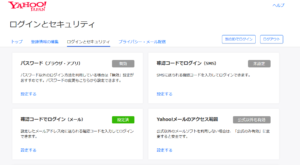
確認コードでログイン(メール)
を登録する。
Login with confirmation code (email)
To register.
使用確認碼登錄(電子郵件)
要註冊。
パスワード(ブラウザ・アプリ)を無効に
これは、SNS認証でなくパスワードによる認証にするよーって事です。
※多分、ここまで理解できない言葉で書いているのはただ単に認証にSNS認証を必ず利用してもらう誘導、ビックデータの収集じゃねーの
的な事だと思う。
これは置いといて
これを行うとメールかSNSか選択できるので迷わずメールにする。
メールだと複数登録できるので不都合場合の回避は簡単。
というかこれが自然かもしれない。
自分は、ヤフ―メールは使ってない。あまりにも面倒で使いにくく、その上遅い、不都合が多い
それで、500円もするからなーと思う。
メールは、googleでもgmoサーバによる自前メールでも比較的容易い。
ログが正直半永久的でスマートだと思ってる。
Disable password (browser / app)
This means that password authentication is used instead of SNS authentication.
* Maybe what I’m writing in words I don’t understand so far is simply guiding people to use SNS authentication for authentication and collecting big data.
I think it’s something like that.
Leave this aside
If you do this, you can choose between email and SNS, so don’t hesitate to email.
Since you can register multiple emails, it is easy to avoid inconveniences.
Or rather, this may be natural.
I don’t use Yahoo! Mail. Too cumbersome and difficult to use, slow and inconvenient
That’s why I think it costs 500 yen.
E-mail is relatively easy, whether it is google or your own e-mail from the gmo server.
I honestly think the logs are semi-permanent and smart.
禁用密碼(瀏覽器應用)
這意味著將使用密碼身份驗證代替SNS身份驗證。
*也許我用我到目前為止不了解的語言寫的只是引導人們使用SNS身份驗證進行身份驗證和收集大數據。
我認為是這樣的。
拋開這個
如果這樣做,您可以在電子郵件和SNS之間進行選擇,因此不要猶豫。
由於您可以註冊多個電子郵件,因此很容易避免帶來不便。
或更確切地說,這可能是自然的。
我不使用Yahoo! Mail。 太麻煩且難以使用,緩慢且不便
這就是為什麼我認為它要花費500日元。
電子郵件相對容易,無論是Google還是來自gmo服務器的電子郵件。
老實說,我認為原木是半永久性的且靈巧的。
それが終了して、
確認コードでログイン(SMS)
の解除をする。
これでパスワードによるログインが可能となる。
認証は、メールで来るので複数のメールを登録しておけば、メールシステムが不都合でも安心して利用できる。
SNSより安心して利用できるのは正直うれしい。
When it’s done,
Login with verification code (SMS)
To cancel.
You can now log in with your password.
Authentication comes by email, so if you register multiple emails, you can use it with confidence even if the email system is inconvenient.
To be honest, I’m glad that you can use it more safely than SNS.
完成後,
使用驗證碼(SMS)登錄
取消。
您現在可以使用密碼登錄。
身份驗證通過電子郵件進行,因此,即使您註冊了多封電子郵件,即使電子郵件系統不方便,也可以放心使用。
老實說,我很高興您可以比SNS更安全地使用它。
ちなみに、
GMOペパボ株式会社
「ロリポップ!」レンタルサーバー
を利用している。

通常だと初回は取られるけど、継続が月100円
で利用できる。
おお!
今なら、
全プランリニューアル記念初期費用無料キャンペーン
期間 2020年8月5日(水)10:00〜2020年12月31日(木)23:59
ですと、自分で3契約しているのでここぞとばかりまた契約しよう。
だって、今なら月継続で100で、20Gのストレージが使ええるし、メールも20人分が作れる。個人の家族向けとして利用している
By the way,
GMO Pepabo Co., Ltd.
“Lollipop!” Rental server
I am using.
Normally, the first time is taken, but the continuation is 100 yen a month
Available at.
Oh!
now,
All plan renewal commemorative initial cost free campaign
Period Wednesday, August 5, 2020 10:00 to Thursday, December 31, 2020 23:59
Then, I have 3 contracts myself, so let’s make another contract here.
Because now, it’s 100 for a month, 20G storage can be used, and mail can be created for 20 people. We use for individual family
順便說說,
GMO Pepabo Co.,Ltd.
“棒棒糖!”出租服務器
我在用。
通常是第一次,但是繼續是一個月100日元
可用於。
哦!
現在,
所有計劃更新紀念初始免費活動
期間2020年8月5日星期三10:00至2020年12月31日星期四23:59
然後,我自己有3個合同,所以讓我們在這裡再做一個合同。
因為現在每個月100個,可以使用20G的存儲空間,並且可以為20個人創建郵件。 我們用於個人家庭
メリット
海外からの不正な行為は、そもそもできないようにできる。
セグメントやIPとレファーで排除しているようで、幾らDDOS攻撃をされても物理的に、認証までは来られない。
DDOS攻撃には、良く遅延や停止があったりするがサポートに連絡すると数分で対応してくれる。
そのままでも終息すれば自動に復旧される。
安い割に、底辺が低い事、低い事。うれしい限り。
wordpressのアドインなどに良く含まれる海外バックドアもこれで全く無意味な事も考えればわかる事。
プラグインもバックドアが開かないからといって良くアップデートするようだけど結局サーバの目的が理解している
このサーバサービスだと物理的に排除してれるので安心ですね。
他のサーバの契約、2000円・月の契約をすべて解約してこちらへ移行したぐらい。
高速かといえば、普通、サーバは今ならすべてSSDへ移行してもらえたのでうれしい限り。
最近のメールなどの不調も無く、googleと使えば無敵感がある。
自動と厳格にするために費用をかけるより、結局、手動で時間と費用を抑制できるサービスです。
ただし、多少の知識も必要ですが、メールだけ運用したいのであれば非常に安直でできる。
merit
Unauthorized acts from overseas can be prevented in the first place.
It seems that it is excluded by segment, IP and referr, and no matter how much DDOS attack is done, it can not physically come to authentication.
DDOS attacks are often delayed or stopped, but if you contact support, they will respond in minutes.
Even if it is left as it is, it will be automatically restored if it ends.
Although it is cheap, the bottom is low and low. As long as I’m happy.
The overseas backdoor, which is often included in wordpress add-ins, can be understood by considering that it is completely meaningless.
Plugins also seem to update well just because the backdoor doesn’t open, but in the end I understand the purpose of the server
This server service is safe because it can be physically excluded.
I canceled all the contracts of other servers and the contract of 2000 yen / month and moved to this place.
Speaking of high speed, I’m glad that all the servers are now migrated to SSDs.
There is no problem with recent emails, and it feels invincible when used with google.
After all, it’s a service that saves you time and money manually, rather than spending money to be automatic and rigorous.
However, although some knowledge is required, if you want to operate only email, you can do it very easily.
值得
首先,可以防止來自國外的未經授權的行為。
似乎它已被段,IP和引薦來源網址排除,並且無論進行了多少DDOS攻擊,它都無法物理地到達身份驗證。
DDOS攻擊通常會延遲或停止,但是如果您與支持人員聯繫,它們將在數分鐘內響應。
即使保留原樣,結束也會自動恢復。
儘管價格便宜,但底部卻越來越低。只要我高興。
經常被包括在wordpress插件中的海外後門,可以通過認為它完全沒有意義來理解。
插件似乎也更新得很好,只是因為後門沒有打開,但最終我了解了服務器的用途
此服務器服務是安全的,因為可以物理排除它。
我取消了其他服務器的所有合同以及2000日元/月的合同,並搬到了這個地方。
說到高速,我很高興所有服務器現在都已遷移到SSD。
最近的電子郵件沒有問題,與Google一起使用時感覺無敵。
畢竟,這項服務可以手動為您節省時間和金錢,而無需花錢去自動化和嚴格。
但是,儘管需要一些知識,但是如果您只想操作郵件,則可以非常輕鬆地完成。
新規契約して、
サイト運用
メール運用
避難、緊急用
と複数契約すれば
自分の時間と面倒から解放された。
それはどこか?
管理する企業は、自動で管理したいそのため、日本のITユーザを排除して
海外から、MSやクラウドなどのサービスを導入する。
だから、ゆっくりだが、その分維持費を利用者に求める。
これが要は無責任って事。経営者だけが、儲かるって事でしょ。
日本にお金が落ちないのはつらい。優秀なITユーザの資源があるのにだ。
面倒と企業による不都合な改変、不都合は対価請求これが今の総体だろうと思う。
それを鑑みても、ここのサーバ群は、正直そのような負担を強いていないのが評価できる。
自分は、
他のサービスのパスワードのロック解除、避難回復メール、認証専用のメールサーバを契約。
家族分として利用している。
これ非常に便利。
メールサーバは基本的に、SSLを利用している、最新TLS3に対応したと通知が来ていたので小さいながら
細かな対応も素晴らしい。
この初期費用が無料の時に、数件契約している!
(^^♪
ありがとう、
GMOペパボ株式会社
「ロリポップ!」レンタルサーバー
Make a new contract
Site operation
Email operation
Evacuation, emergency
If you make multiple contracts with
Freed from my time and hassle.
Where is it?
Companies that manage want to manage automatically, so exclude Japanese IT users
Introduce services such as MS and cloud from overseas.
So, slowly, but ask the user for the maintenance fee.
This is irresponsible. Only the manager is profitable, isn’t it?
It’s hard not to lose money in Japan. It has the resources of excellent IT users.
Troublesome and inconvenient modification by the company, inconvenience is billing compensation I think this is the whole now.
Even in view of this, it can be evaluated that the servers here do not impose such a burden honestly.
I am
Contract for unlocking passwords for other services, evacuation recovery mail, and mail server dedicated to authentication.
I use it for my family.
This is very convenient.
The mail server basically uses SSL, and I was notified that it was compatible with the latest TLS3, so although it is small
The detailed correspondence is also wonderful.
When this initial cost is free, I have several contracts!
(^^ ♪
Thank you,
GMO Pepabo Co., Ltd.
“Lollipop!” Rental server
簽訂新合同
現場作業
郵件操作
緊急疏散
如果您與
從我的時間和麻煩中解脫出來。
它在哪裡?
管理公司希望自動進行管理,因此排除了日本IT用戶
從國外引入MS和雲等服務。
因此,請慢慢向用戶詢問維護費用。
這是不負責任的。只有所有者是有利可圖的。
在日本很難不賠錢。它擁有出色的IT用戶資源。
公司的麻煩和不便修改,不便就是開票賠償我想這是現在的全部。
即使考慮到這一點,也可以評估出這裡的服務器沒有施加這種負擔。
我是
合同解鎖其他服務,疏散恢復郵件和專用於身份驗證的郵件服務器的密碼。
我用它給我的家人。
這很方便。
郵件服務器基本上使用SSL,並且通知我它與最新的TLS3兼容,因此儘管它很小
詳細的信件也很棒。
當這個初始費用免費時,我有幾個合同!
(^^♪
謝謝,
GMO Pepabo Co.,Ltd.
“棒棒糖!”出租服務器