
スクリーンショットや写真を撮影して喜んでいても、やはり実機のメディア容量に不安が残る。
IPHONEなどのiOSはこの点、itunesやクラウドで本当に面倒な状況。
Even if you are happy to shoot screenshots and photos, you still have concerns about the media capacity of the actual machine.
In this regard, iOS such as IPHONE is really troublesome in itunes and the cloud.
ネットフォルダにすべてを任せる、これは過言ではない。
その上、無料だと帯域は細い、ファイルも破損しやすく、今のクラウド環境は、やはりお金を持っている奴には叶わないというような状況。
Leave everything to the net folder, this is not an overstatement.
Besides, if it is free, the band is thin, the file is also easy to break, and the current cloud environment is such that it does not come true to those who have money.
2次保護が適用している実機に対してよほど管理能力を問われるぐらいな施し。
UBSで接続もあるが、実際ケースから取り外す事すら面倒。
iOSのWIFIは結局不安定で使い物にならない。
面倒で仕方ない。
Approximately enough administrative capacity can be asked for actual machines to which secondary protection is applied.
There is connection with UBS, but even removing it from the actual case is troublesome.
WIFI on iOS is eventually unstable and useless.
Not be helped cumbersome.
すでに、2T程度の外部ストレージに10万ファイルほどの写真。
これはほとんど外的な金品が施工されていない。
IOSはそれは途方も無い時間か金額を要するが
androidは、ちょっとした知識でおにぎりが、ピザになる。
androidは、無償でファイルマネージャーが存在する物がある。
これだけは、感心する。
A picture about 100 thousand files already in 2 T external storage.
It is almost impossible to construct external goods.
Although IOS requires a tremendous amount of time or money
With android, bread becomes a pizza with a little knowledge.
Android has free files manager.
I am impressed only this.
ASUSのファイルマネージャ
ASUS File Manager
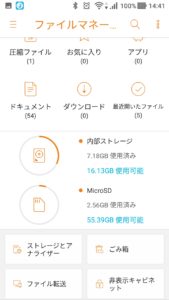
こんな感じだけど、ファイル転送をクリック。
It’s like this, but click on file transfer.
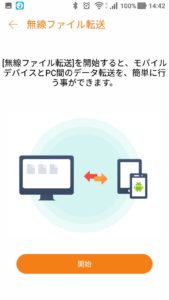
上のように表示されるので、単純に実行する。
Since it is displayed as above, simply execute it.
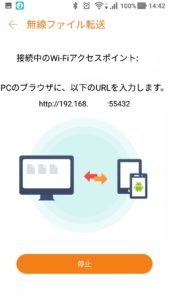
PCなどブラウザで
http://192.168._._:55432と入れてエンターを押す。
With a browser such as PC
Enter http: // 192.168._. _: 55432 and press enter.
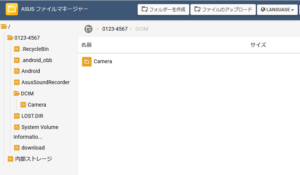
こんな感じでPCにダウンロードできる。
フォルダを選択して圧縮してダウンロードも可能。
これによって回線スピードや制限や認証を気にしないで実機にダウンロード可能。
You can download to the PC like this.
You can also select a folder to compress and download.
This allows you to download to the actual machine without worrying about line speed, limitation and authentication.
莫大な容量は、通常のWEBダウンロードとほぼ同じ。
利用できないか、ファイルが破損する。
個別に地道に保存する他無い。
Huge capacity is almost the same as ordinary WEB download.
It can not be used or the file is corrupted.
You can save them separately steadily.
パーミッション(フォルダの読み書き実行の制御設定)がASUSで設定されているので何も意識しなくても安全に利用できる。
Since permission (control setting of reading and writing of folder) is set by ASUS, it can be safely used without any consciousness.
アップロードも可能
これは、不正なファイル拡張子なども検査されるので安心。
SMBも備えているので、
Can also upload
It is safe because it also checks incorrect file extensions and so on.
Since it also has SMB,
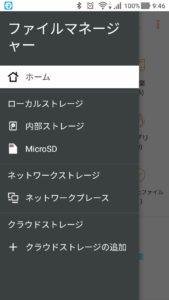
ネットワークプレースがSMBなので実機にSMB経由で保存できる。
こちら方が、ファイルを壊す恐れがないかもしれないがPCの設定も必要となる。
Since the network place is SMB, it can be saved to the real machine via SMB.
Although this may not be a risk of breaking the file, PC setting is also necessary.
注意点は、httpであるため、実行中は宅内やホテルのIP範囲に存在するユーザに見えてしまうという事。
自宅向けは、55432などを閉鎖しているので外部からのアクセスは不可能ですが、ホテルなどには、別な方法を使いましょう。
Since the point to be noted is http, it means that it will be visible to users who are present in the IP range of the customer or the hotel during execution.
Since it is closed for 55432 etc for home, it is impossible to access from the outside, but let’s use another method for hotels etc.
後、勝手に実行されたり、外部からのリモートなども驚異もあるそれも簡単、アプリロックなどのアプリで十分
After, or it is arbitrarily executed,
Remote from the outside is also dangerous
There is also it easy enough, an application such as application lock enough