
点群の標高調整
初めのこれ!
ここでも、標高の変更はできるのだが基本的には、
Adjustment of elevation of point cloud
This is the beginning!
Again, although altitude can be changed, basically,
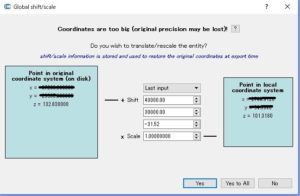
見ての通り
127.521999が点群の生情報
96.011999が、与えた移動量の換算
As you can see
127.521999 is raw information of the point group
96.011999 converts the transfer amount given
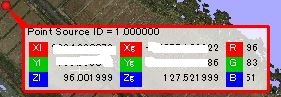
便利です。ローカル座標と空間座標を同時に持つことができるようです。
このままでは、他で利用できないので、変換する必要があるので
そこで、ようやくわかったのが、
Convenient.
It seems to be able to have local coordinates and spatial coordinates at the same time.
As it is, as it can not be used elsewhere, it is necessary to convert it
Therefore, the was finally found,
“Edit-Apply transformation”
AxisとEulerがあるけれど
Rotatin を用いると重心からの回転となるので利用できないので
Axis 位置方向のみ移動
Axis Translationだと思う
ちなみに、Eulerは3Dの物体のような物を想定
概要はこれ
Although I have Axis and Euler
Since Rotatin can not be used because it rotates from the center of gravity when using Rotatin
Move only Axis position direction
I think that it is Axis Translation
By the way, Euler assumes things like 3D objects
An overview is this
Axis
https://en.wikipedia.org/wiki/Axis%E2%80%93angle_representation
Euler
https://en.wikipedia.org/wiki/Euler_angles
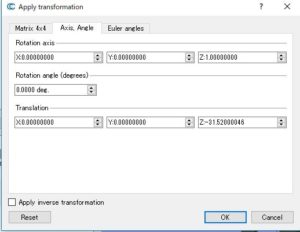
これでOKすると
When this is OK

点群の標高が変更されます。
今回のような地形を扱うなら非常に便利っす
The elevation of the point cloud will be changed.
Very handy if dealing with terrain like this time