Raspberry Pi にFedoraを組み込んで稼働させ2015年からもうそろ3年。
全く停止もなくつまらないというか、安心というか
巷では、頻繁に更新されているが、ここに来てwebminの前に、
We built Fedora in Raspberry Pi and started it, and it’s been three years since 2015.
Totally or rather boring without stopping, or rather peace of mind
In the streets, it has been frequently updated, in front of the webmin to come here,

来ましたね、ようやく。
firefoxが1803の為に不調で再インスコ
画面が保存できたので、切り抜ける方法
至って簡単、本来 認証局も作れば良いのだが、
とりあえず、例外を追加をクリック
例外追加で気にせずOKで接続できる。
もし事前にするならば、Firefoxの場合
about:preferences#privacy と入力するかオプション
I came, finally.
Firefox failed due to 1803 and reinstalled
Since the screen could be saved, how to get through
Very simple, but I should make even the original certification authority,
Anyway, click Add Exception
You can connect with OK without worrying about adding exceptions.
If you do it in advance, in the case of Firefox
Type “about: preferences # privacy” or option
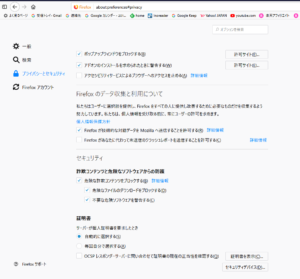
証明書を表示
View certificate

サーバの証明書に例外追加すればいい。
You can add an exception to the server’s certificate.