
「リバースチャージモード」タグアーカイブ

ヤフーのSNS認証が届かなくて恐怖した!

ヤフーのSNS認証が届かなくて恐怖した!
I was scared that Yahoo’s SNS certification did not arrive!
我很害怕Yahoo的SNS認證還沒到!
雨が降って端子に数滴入った
仕事中に、スマートフォンが突如故障!
It rained and a few drops entered the terminal
My smartphone suddenly broke down during work!
下著雨,幾滴水進入航站樓
我的智能手機在工作期間突然壞了!
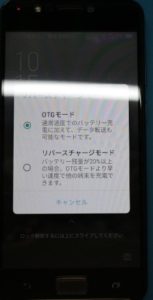
IMG_3934

ただそれだけだ。この現象すでに4台目
But that’s it. This phenomenon is already the 4th
就是這樣。這種現像已經是第四
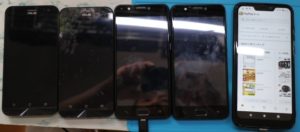
IMG_3937
サービス曰く、原因が不明なので修理、最低で1万ほどと使えない期間が1-2週間考えると
アホらしく思って再度数台用意している。

According to the service, the cause is unknown, so repair, at least 10,000 and the period of unavailability is 1-2 weeks
I think it’s stupid and prepare several units again.
根據服務,原因不明,因此需要修理,至少10,000,並且無法使用的時間為1-2週
我認為這很愚蠢,需要再準備幾個單元。

※zenfone のOS 8以降だったと思う。
リバースチャージモード以前は、停止する事ができたのだが今は通常でONモードしかない。
本当に不要だよねーて思う。故障の頻度を上昇するだけだから。
その上、この点滅、キャンセルは一切機能しない。
多分、ケーブルによって判断されるべきモードだろうけど
このリバースチャージが点滅して一生だめ。
面白いよね。キャンセル押したらデフォルトだからOTGモードの選択となると思う。
しかし、電圧が流れているから違うでしょ!?という事で再度選択を迫られる。
これ考えてもおかしいよね。
リバースチャージモードしかないって事。
それを選択しても、ケーブルがリバースチャージモード用でないのでやっぱり選択を進める。
全くおかしい機能でした。
本当にやめてほしい。ON OFFの機能が相当なのにね。
自動にする意味がない。
通電の電圧で判断されていると思うのでしっかりとした保護回路も無いと思う。
これ自分的には昔に戻してほしい感が常にある。
zenfone系の大容量が搭載しているものは注意です。
というか考えたほうがいいですね。

* I think it was OS 8 or later of zenfone.
Before the reverse charge mode, it was possible to stop it, but now it is normal and there is only ON mode.
I think it’s really unnecessary. It only increases the frequency of failures.
Besides, this blinking and canceling doesn’t work at all.
Probably the mode that should be judged by the cable
This reverse charge flashes and you can’t do it for the rest of your life.
It’s interesting. If you press Cancel, it’s the default, so I think you’ll be selecting OTG mode.
However, it is different because the voltage is flowing! ?? So I have to make a choice again.
It’s strange to think about this.
There is only reverse charge mode.
Even if you select it, the cable is not for reverse charge mode, so proceed with the selection.
It was a completely strange feature.
I really want you to stop. The ON / OFF function is considerable.
There is no point in making it automatic.
I think that it is judged by the energizing voltage, so I don’t think there is a solid protection circuit.
I always have the feeling that I want this to go back to the old days.
Be careful of those equipped with a large capacity of zenfone system.
Or rather, you should think about it.

根據服務,原因不明,因此需要修理,至少10,000,並且無法使用的時間為1-2週
我認為這很愚蠢,需要再準備幾個單元。

*我認為是zenfone OS 8或更高版本。
在反向充電模式之前,可以將其停止,但是現在它是正常的,只有ON模式。
我認為這真的沒有必要。它只會增加失敗的頻率。
此外,這種閃爍和取消根本不起作用。
可能應該由電纜判斷的模式
這種反向充電會閃爍,您一生都無法這樣做。
這真有趣。如果按取消,它將是默認設置,因此您可以選擇OTG模式。
但是,不同之處在於電壓在流動! ??因此,我必須再次做出選擇。
考慮到這一點很奇怪。
只有反向充電模式。
即使選擇該電纜,該電纜也不適用於反向充電模式,因此請繼續進行選擇。
這是一個完全奇怪的功能。
我真的要你停下來開/關功能相當可觀。
使其自動化是沒有意義的。
我認為這是由通電電壓來判斷的,所以我認為沒有牢固的保護電路。
我總是有種希望回到過去的感覺。
小心那些配備了大容量zenfone系統的人。
或更確切地說,您應該考慮一下。

やちゃった感があって
この点滅!
汗 (‘◇’)ゞ
だがすでに4台目なので正直慣れていた。
I feel like I’m done
This flashing!
Sweat (‘◇’) ゞ
However, since it is already the 4th unit, I was honestly accustomed to it.
我覺得我完成了
這個閃爍!
汗水(’◇’)ゞ
但是,由於它已經是第四單元了,所以我已經很習慣了。
続きを読む ヤフーのSNS認証が届かなくて恐怖した!
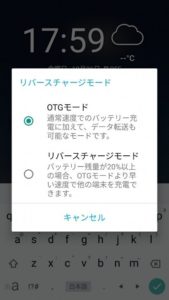

ASUS全般かな?リバースチャージモードが出続けるの解決方法!

良くわからんかったけど、
一度陥ると故障の状態になる。
内部的なチップかそもそも
アプリがお粗末なのか
対処方法は一つ
以下のように行う。
電力管理
通知
Power Masterアプリ
を見つけて通知をOFF
それで解消する。
zenfone4から無効にするチェックが除かれたのは不愉快ですね。
故障しやすいと思う。

I did not understand well,
Once it falls, it will be in a failure state.
Internal chip first place
Is the app poor?
One solution
Perform as follows.
Power management
notification
Power Master app
Find and turn off notifications
Then it is solved.
It is unpleasant that the check to disable is removed from zenfone4.
I think it is easy to break down.

ASUS全般かな?リバースチャージモードが出続ける
昔はあったが、今は無い
結局、故障の原因になりやすいのが分かった。
雨などは、全く耐性が無いですね
ケーブルの故障が、本機の故障に直結
ASUSのサードパーティ
ZenUI?
このモード表示があれば、必要な時に使えるように
するのが賢明だが、自動の場合に
端子部分の使い方を考えなければならない。

これが点滅すると、既に故障です。
収まることがあるのは、内部モジュールがまだ完全に故障していないだけの話
抵抗の破損が完全でない。
但し、スリープモードならまだ継続できるけど
再起動や電源をOFFにすると故障を累積となるようで
結局故障する。
CDCF561D
If this flashes, it is already a malfunction.
The only thing that may fit is that the internal module has not yet completely failed.
Resistance breakage is not complete.
However, you can still continue in sleep mode
When restarting or turning off the power, the failure seems to be cumulative
Eventually breaks down.

如果閃爍,則表示已經出現故障。
唯一可能適合的是內部模塊尚未完全失敗。
阻力破壞尚未完成。
但是,您仍然可以繼續處於睡眠模式
重新啟動或關閉電源時,故障似乎是累積的
最終崩潰了。

p7041530

Is it ASUS in general? Reverse charge mode continues to appear
There was a long time ago but there is no now
Eventually, it turned out to be a cause of failure.
Rain is not resistant at all
A cable failure is directly linked to a failure of the unit.
ASUS third party
ZenUI?
Maybe making a failure
With this mode display, you can use it when you need it.
It ’s wise to do it, but it ’s automatic.
You must think about how to use the terminal.

華碩不知道是否通用?
反向充電模式繼續進行
很久以前,但現在沒有了
畢竟,人們發現,容易成為故障的原因。
雨根本沒有抵抗力
電纜故障與設備故障直接相關。
華碩第三方
也許,做誘導失敗
使用此模式顯示,您可以在需要時使用它。
這樣做是明智的,但這是自動的。
你必須考慮如何使用終端。

開発者向けオプション
usb選択
これは、リバースチャージモードより後なので
関係が無い。
端子からの入出力電圧で判断していると思うのだが
PTCサーミスタ
ポリスイッチなど無いだろうから、過電に耐性が無い
故障前提の機能だろう。
やめたほうが良いと思う。

Developer options
usb selection
This is after reverse charge mode
PTC thermistor
There is no relationship.
I think it is judged by the input / output voltage from the terminal.
There will be no polyswitch, so it is not resistant to overpower
This is a function that assumes failure.
I think it’s better to stop.

開發者選項
usb選擇
這是在反向充電模式之後
PTC熱敏電阻
沒有關係。
我認為它是由終端的輸入/輸出電壓來判斷的。
沒有聚合物開關,所以它不能抵抗過功率
這是一個假設失敗的功能。
我認為最好停下來。

リバースチャージモードの有効 無効
何故、安全装置の表示を消したのか
意味不明なASUSでした。

Reverse charge mode enabled / disabled
Why did the safety device display disappear?
It was an unknown ASUS.

啟用/禁用反向充電模式
為什麼安全裝置顯示消失?
這是一個未知的華碩。

ASUS全般かな?リバースチャージモードが出続ける

ASUS全般かな?リバースチャージモードが出続ける
昔はあったが、今は無い
結局、故障の原因になりやすいのが分かった。
雨などは、全く耐性が無いですね
ケーブルの故障が、本機の故障に直結
ASUSのサードパーティ
ZenUI?
このモード表示があれば、必要な時に使えるように
するのが賢明だが、自動の場合に
端子部分の使い方を考えなければならない。

これが点滅すると、既に故障です。
収まることがあるのは、内部モジュールがまだ完全に故障していないだけの話
抵抗の破損が完全でない。
但し、スリープモードならまだ継続できるけど
再起動や電源をOFFにすると故障を累積となるようで
結局故障する。
CDCF561D
If this flashes, it is already a malfunction.
The only thing that may fit is that the internal module has not yet completely failed.
Resistance breakage is not complete.
However, you can still continue in sleep mode
When restarting or turning off the power, the failure seems to be cumulative
Eventually breaks down.

如果閃爍,則表示已經出現故障。
唯一可能適合的是內部模塊尚未完全失敗。
阻力破壞尚未完成。
但是,您仍然可以繼續處於睡眠模式
重新啟動或關閉電源時,故障似乎是累積的
最終崩潰了。

p7041530

Is it ASUS in general? Reverse charge mode continues to appear
There was a long time ago but there is no now
Eventually, it turned out to be a cause of failure.
Rain is not resistant at all
A cable failure is directly linked to a failure of the unit.
ASUS third party
ZenUI?
Maybe making a failure
With this mode display, you can use it when you need it.
It ’s wise to do it, but it ’s automatic.
You must think about how to use the terminal.

華碩不知道是否通用?
反向充電模式繼續進行
很久以前,但現在沒有了
畢竟,人們發現,容易成為故障的原因。
雨根本沒有抵抗力
電纜故障與設備故障直接相關。
華碩第三方
也許,做誘導失敗
使用此模式顯示,您可以在需要時使用它。
這樣做是明智的,但這是自動的。
你必須考慮如何使用終端。

開発者向けオプション
usb選択
これは、リバースチャージモードより後なので
関係が無い。
端子からの入出力電圧で判断していると思うのだが
PTCサーミスタ
ポリスイッチなど無いだろうから、過電に耐性が無い
故障前提の機能だろう。
やめたほうが良いと思う。

Developer options
usb selection
This is after reverse charge mode
PTC thermistor
There is no relationship.
I think it is judged by the input / output voltage from the terminal.
There will be no polyswitch, so it is not resistant to overpower
This is a function that assumes failure.
I think it’s better to stop.

開發者選項
usb選擇
這是在反向充電模式之後
PTC熱敏電阻
沒有關係。
我認為它是由終端的輸入/輸出電壓來判斷的。
沒有聚合物開關,所以它不能抵抗過功率
這是一個假設失敗的功能。
我認為最好停下來。

リバースチャージモードの有効 無効
何故、安全装置の表示を消したのか
意味不明なASUSでした。

Reverse charge mode enabled / disabled
Why did the safety device display disappear?
It was an unknown ASUS.

啟用/禁用反向充電模式
為什麼安全裝置顯示消失?
這是一個未知的華碩。