また何やらセキュリティを落す行動が、マイクロソフトのOSに搭載された。
「今すぐ会議を開始する」
SkypeがOSにシステムとして統合されようだ。

officeの不都合も直していないのに、ほどほど他人の情報を取得したいようだ。
漏れに、たいして積極的だ。
使うのには、結局、skypeのように登録が必要となる。
あれほど、不安定なoutlockに世界標準の使用でも無く、信頼性は無く、メールごときに
毎年、泣かされるのにだ、今度はそのアカウントで会議だと
gmailのGoogle Meetの安定さから見れば、リソースをこれほど複雑にする必要もない。
Google Meetを、使っているので早速アンインストール 出来ないのだ。
システムだからね!
という事は、セッションポートは、また例のごとく隠れたポート接続になるので
安易すぎる。
出来るのはこれだけ
右クリック
設定
アイコン
と入力
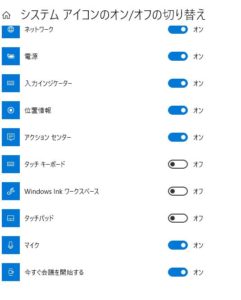
これだけ
今すぐ電子会議を開始するを非表示にするのみ
その上、windows update毎に再度表示されるようである。
どうしても、セキュリティの穴を開けたいと率先しているようにしか見えない。
それは、自分だけだろうか?
After all, you need to register like skype to use it.
That’s not the world standard use for unstable outlock, it’s unreliable, like email
Every year, I’m crying, but this time it’s a meeting with that account
Given the stability of gmail’s Google Meet, resources don’t have to be this complicated.
I’m using Google Meet, so I can’t uninstall it immediately.
Because it’s a system!
This means that the session port will be a hidden port connection as usual.
It’s too easy.
This is all you can do
right click
Configuration
icon
Enter
only this
Just hide Start Electronic Conference Now
Besides, it seems to reappear on every windows update.
By all means, it seems that he is taking the initiative to make a hole in security.
Am I the only one?
Schließlich müssen Sie sich wie Skype registrieren, um es verwenden zu können.
Dies ist nicht der weltweite Standard für instabile Ausgänge, sondern unzuverlässig wie E-Mails
Ich weine jedes Jahr, aber diesmal ist es ein Treffen mit diesem Konto
Angesichts der Stabilität von Google Meet in Google Mail müssen Ressourcen nicht so kompliziert sein.
Ich verwende Google Meet und kann es daher nicht sofort deinstallieren.
Weil es ein System ist!
Dies bedeutet, dass der Sitzungsport wie gewohnt eine versteckte Portverbindung ist.
Es ist zu einfach.
Das ist alles was Sie tun können
Rechtsklick
Aufbau
Symbol
Eingeben
nur das
Verstecken Sie einfach Start Electronic Conference Now
Außerdem scheint es mit jedem Windows-Update wieder aufzutauchen.
Auf jeden Fall scheint er die Initiative zu ergreifen, um ein Sicherheitsloch zu schaffen.
Bin ich der Einzige?
Après tout, vous devez vous inscrire comme skype pour l’utiliser.
Ce n’est pas l’utilisation standard mondiale pour un outlock instable, ce n’est pas fiable, comme le courrier électronique
Je pleure chaque année, mais cette fois c’est une rencontre avec ce compte
Compte tenu de la stabilité de Google Meet de gmail, les ressources n’ont pas besoin d’être aussi compliquées.
J’utilise Google Meet, je ne peux donc pas le désinstaller immédiatement.
Parce que c’est un système!
Cela signifie que le port de session sera une connexion de port caché comme d’habitude.
C’est trop facile.
C’est tout ce que tu peux faire
clic-droit
Configuration
icône
Entrer
seulement ça
Masquer simplement Démarrer la conférence électronique maintenant
En outre, il semble réapparaître à chaque mise à jour de Windows.
Par tous les moyens, il semble qu’il prenne l’initiative de faire une brèche dans la sécurité.
Suis-je le seul?
Dopotutto, devi registrarti come skype per usarlo.
Questo non è l’uso standard mondiale per l’outlock instabile, è inaffidabile, come la posta elettronica
Piango ogni anno, ma questa volta è un incontro con quel racconto
Data la stabilità di Google Meet di Gmail, le risorse non devono essere così complicate.
Sto utilizzando Google Meet, quindi non posso disinstallarlo immediatamente.
Perché è un sistema!
Ciò significa che la porta della sessione sarà una connessione alla porta nascosta come al solito.
È troppo facile.
Questo è tutto quello che puoi fare
clic destro
Configurazione
icona
accedere
solo questo
Basta nascondere Avvia conferenza elettronica ora
Inoltre, sembra riapparire con ogni aggiornamento di Windows.
In ogni caso, sembra che stia prendendo l’iniziativa di creare una falla nella sicurezza.
Sono l’unico?
Después de todo, debes registrarte como skype para usarlo.
Ese no es el uso estándar mundial para outlock inestable, no es confiable, como el correo electrónico
Lloro todos los años, pero esta vez es una reunión con esa cuenta
Dada la estabilidad de Google Meet de gmail, los recursos no tienen por qué ser tan complicados.
Estoy usando Google Meet, por lo que no puedo desinstalarlo inmediatamente.
¡Porque es un sistema!
Esto significa que el puerto de sesión será una conexión de puerto oculto como de costumbre.
Es demasiado fácil.
Esto es todo lo que puedes hacer
botón derecho del ratón
Configuración
icono
Entrar
solo esto
Simplemente oculte Iniciar conferencia electrónica ahora
Además, parece reaparecer con cada actualización de Windows.
Por supuesto, parece que está tomando la iniciativa de hacerse un hueco en la seguridad.
¿Soy el único?