「blender」カテゴリーアーカイブ

Blender:選択で裏も選択する方法

選択で裏面も選択したい場合がほとんど
(^^>
その方法 昔の、Limit Selection
今は、アイコンを覚えるか ALT+Z
とりあえず、結局はアイコン覚えたほうが良いので
見ればわかるって事
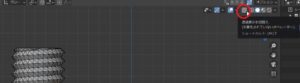
クリック前は、裏面の頂点見えず
SnapCrab_NoName_2020-1-8_12-40-50_No-00
In most cases you want to select the back side as well
(^^>
The old way, Limit Selection
Now, remember the icon or ALT + Z
For the time being, it’s better to remember the icons
You can see if you look
Before clicking, the top of the back is not visible

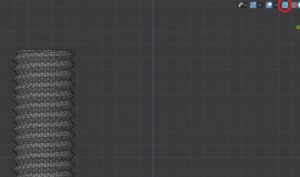
クリック後は、裏面の頂点が見えている。
SnapCrab_NoName_2020-1-8_12-40-54_No-00
After clicking, the vertex on the back is visible.

後は、どちらかの表示で選択すればOK
After that, if you select in either display OK

Blender:ナイフ(切断)の方法

モジュールESPで操作OLEDでの画面の大きさに少々不満で
ならという事でスマートホンホルダーを制作
通常でWIFI サーバ起動するのでこれで操作できれば簡単かと
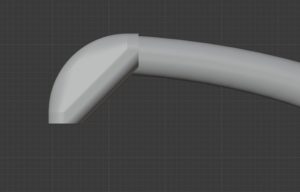
そこで昔作成したデータをナイフで削除して合成しようと

Operation with module ESP I was a little dissatisfied with the screen size on OLED
Produce a smart phone holder
Normally the WIFI server starts, so if it can be operated with this, it will be easy
So I tried to combine the data created in the past with a knife

まずオブジェクトを選択
SnapCrab_NoName_2020-1-8_11-53-17_No-00
First select the object

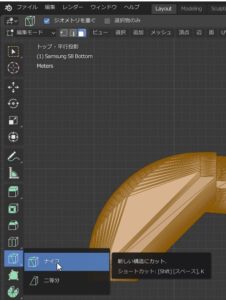
編集モード
ナイフ
SnapCrab_NoName_2020-1-8_11-54-4_No-00
Edit mode
knife

初めの点を選択
切る方向線が出るので
SnapCrab_NoName_2020-1-8_11-54-11_No-00
Select first point
Since the cutting direction line comes out

ここで
C
を押すと角度に制限を実施
Z
を押すと裏まで透過させるて切る

線を動かすと切る位置が明確に表示され
SnapCrab_NoName_2020-1-8_11-55-21_No-00

here
C
Press to limit the angle
Z
Press to cut through to the back

Moving the line clearly shows where to cut

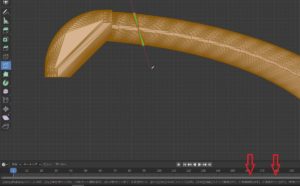
最後に
左クリックで状態確認
スペースで確定。
向かって左が、ZをOFF 右が ZをON
ほとんどの場合は、ZをONだけど複雑なモデリングだと表面を回転しながら切るときには便利。

Finally
Left click to check status
Confirm with space.
The left side turns off Z, the right turns on Z
In most cases, Z is ON but complex modeling is useful when cutting while rotating the surface.

Blender:台所のフックを初めからモデリング作る5

良しという事で、ちょっと見ると
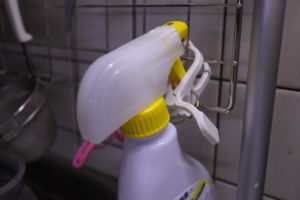
妻の一工夫を発見!
メッシュにぶら下がる怪しいアルコールスプレー
これは、すごいな (^^>
IMG_3280
If you look at it for a moment,
I found my wife’s device!
Suspicious alcohol spray hanging on the mesh
This is amazing (^^>

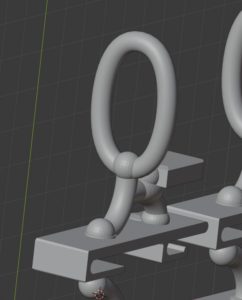
そこで急遽
追加モデリング
SnapCrab_NoName_2020-1-8_2-58-44_No-00
So in a hurry
Additional modeling

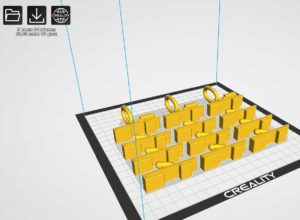
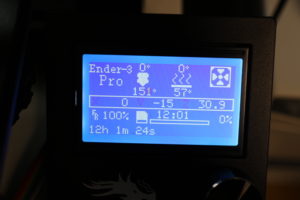
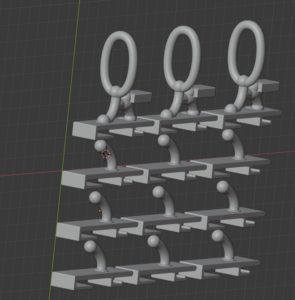
これで9時間
うまくいくかな?
とりあえずスタート
エンダーちゃんは、7時間動作させても、
切れる事も無く、全く正常に稼働している。
今回は、10時間だ大丈夫だろうか?
130mほど稼働しているが、
ヒューマンエラーはあるが、プリンターの失敗と言うような事も無い。
安心して動作させられる。
不思議だ。
SnapCrab_NoName_2020-1-8_2-59-0_No-00

SnapCrab_NoName_2020-1-8_2-59-12_No-00
This is 9 hours
Does it work?
Start for the time being
Ender-chan can work for 7 hours,
It has not been cut and is operating normally.
Is it okay 10 hours this time?
It is running about 130m,
Although there are human errors, there is no such thing as a printer failure.
It can be operated with peace of mind.
It’s strange.

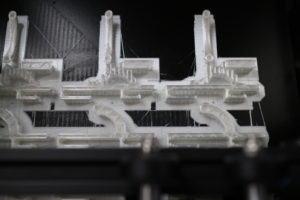
積層中
良い感じ
IMG_3282
During lamination
Good feeling

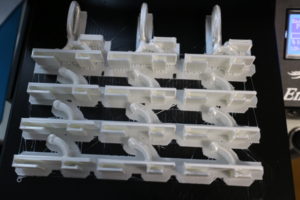
完成!
なんと12時間もかかってしまった。
IMG_3294
IMG_3295
Complete!
It took 12 hours!

スプレー用フックは、初回にしては良い出来だ。
結構すべての製品に対応かと
強度はというと2k程度は大丈夫だと思う。
妻の使い方を見ていると頻繁に使っている。
このようなアルコール製品は、サクッととりだし、シュッシュ
サクッと戻すを繰り返す。
なので、1kg程度+加速度に対する荷重を考慮する必要性があったので
上下に支点を設置、荷重のかかる位置は、支点拡散できるにした。
尚且つ、戻すときに揺れる
スプレー部にアルコールや塩素が付着すると飛散するのでよろしくない。
そこで、ハンドルが前に行かない様にプロテクターを設置
ハンドルをかける位置は、楕円にする事で斜めからの出し入れ
も直方向へ荷重で補正するようにした。
フィット感は良い。
IMG_3298
Spray hooks are good for the first time.
Does it support all products?
I think the strength is about 2k.
When I see how to use my wife, I use it frequently.
Alcohol products like this are crispy and slushy
Repeat returning quickly.
So it was necessary to consider about 1kg + load for acceleration
The fulcrum is set up and down, and the fulcrum can be spread at the position where the load is applied.
In addition, it shakes when returning
If alcohol or chlorine adheres to the spray part, it will be scattered.
So, install a protector so that the handle does not go forward
The handle can be placed at an angle by making it elliptical.
Is also corrected by the load in the direct direction.
The fit is good.