10/8に間に合った!
IFTTT からの離脱: スマートロック簡易完成版!
用意するのは、
何か転売やーがいるようですね。
amazon で4万円ほどで出品されているようですが、
本家から購入したほうが良いです。
14000円程度です。
https://jp.candyhouse.co/
I was in time for 10/8!
Withdrawal from IFTTT: Smart lock simple completed version!
What to prepare
There seems to be some resale.
It seems that it is listed on Amazon for about 40,000 yen,
You should buy it from the head family.
It’s about 14000 yen.
candy houseのダッシュボードを使えるようにします。
Allows you to use the candy house dashboard.
https://my.candyhouse.co/#/
API設定で
API Keysを作成します。
ADDを押せば、作成されます。
一度作成して例えば、問題が起きた場合でも、ADDで古いkeyをDELETEすれば
直ぐに問題解決だから本当に安心です。
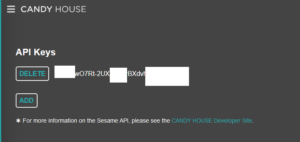
In API settings
Create API Keys.
Press ADD and it will be created.
Create it once, for example, if a problem occurs
api keyはメモ帳へコピー
$SesameIDは、
ダッシュボードのセサミリストで表示されたこの赤枠の文字列をメモ帳へコピー

まずサーバ契約
ここ!
やっぱりここ!
月 100円
今なら初期費用が無料のなので!

これで準備完了です。
セサミmini +wifiで 13500円
サーバ契約 100円
でスマートロックを複数で管理できます。
First server contract
here!
After all it is here!
100 yen a month
Now the initial cost is free!
You are now ready.
Sesame mini + wifi 13500 yen
Server contract 100 yen
You can manage multiple smart locks with.
アクセス制限を作ります。
面倒なシステムほど、金額の割りに複雑にして対価を得ようとしますが
簡単です。
Create access restrictions.
The more troublesome the system is, the more complicated it is for the amount of money and the more it tries to get the price.
it’s simple.
—————————-
ipcheck.php
<!–?php echo $_SERVER[‘REMOTE_ADDR’]; ?–>
—————————-
目的は、スマートフォンや自宅などの契約先を確認したいのでこのファイルを
filezillaなどでサーバにファイルを転送!
https://filezilla-project.org/
次に、スマートフォンや自宅や会社や友人など手当たり次第に
htpp://契約サーバ名/ipcheck.php
にアクセスします。
アクセスするとipアドレスが表示されます。
そのipアドレスの所在を確認
このようなところで探すと
https://www.cman.jp/network/support/ip.html
ipアドレスの範囲が表示されます。
例えば
192.168.10.2
と表示されたものを上記で探すと
192.168.10.0-192.168.10.54
と表示されていると
とりあえず
The purpose is to check the contractor such as smartphone or home, so this file
Transfer files to the server with filezilla etc.!
Next, randomly, such as smartphones, homes, offices, friends, etc.
htpp: // contract server name / ipcheck.php
To access.
When you access it, the IP address will be displayed.
Check the location of the IP address
If you look for it in a place like this
The range of IP addresses is displayed.
For example
192.168.10.2
If you look for the one displayed above
192.168.10.0-192.168.10.54
Is displayed
For the time being
—————————-
htaccess.txt
order deny,allow
deny from all
allow from 192.168.10.
—————————-
とすると192.168.10.に合致するものだけがアクセスが可能となります。
これで莫大なアクセスは制限をかけたことになります。
例えば、攻撃されても、サーバの運用側が防いでくれますので問題ありません。
Then, only those that match 192.168.10. Can be accessed.
This means that huge access has been restricted.
For example, even if it is attacked, there is no problem because the operation side of the server will prevent it.
これを、
filezillaなどでサーバにファイルを転送!
送った後に、ファイルのパーミッションは「604」にしてください。
そして名前を変更します。
htaccess.txtを.htaccess
this,
Transfer files to the server with filezilla etc.!
After sending, please set the file permission to “604”.
Then change the name.
htaccess.txt to .htaccess
後は
—————————-
//施錠する場合
http://契約サーバ名/candylocksample.php?p=testsample0123&m=l
//解除する場合
http://契約サーバ名/candylocksample.php?p=testsample0123&m=u
//
// testsample0123 は変更できます。
//変更した場合は、$pasを変えればよい。
—————————-
candylocksample.php
//パス
$pas=’testsample0123′;
$phpp = $_GET[‘p’];
//モード
//l=lock;
//u=unlock;
$phpm = $_GET[‘m’];
$SesameID=’ここにセサミIDを入れます’;
$apikey = ‘ここにAPI KEYを入れます’;
if($phpp==$pas)
{
switch($phpm)
{
case ‘l’:
//lock
$url = ‘https://api.candyhouse.co/public/sesame/’.$SesameID;
$ch = curl_init();
curl_setopt($ch, CURLOPT_URL, $url);
$data = array(‘command’=>’lock’);
$data_json = json_encode($data);
curl_setopt($ch, CURLOPT_HTTPHEADER, array(‘Authorization: ‘ . $apikey, ‘Content-Type: application/json’));
curl_setopt($ch, CURLOPT_CUSTOMREQUEST, ‘POST’);
curl_setopt($ch, CURLOPT_POSTFIELDS, $data_json);
curl_exec($ch);
curl_close($ch);
echo ‘施錠を実行中です。’;
break;
case ‘u’:
//unlock
$url = ‘https://api.candyhouse.co/public/sesame/’.$SesameID;
$ch = curl_init();
curl_setopt($ch, CURLOPT_URL, $url);
$data = array(‘command’=>’unlock’);
$data_json = json_encode($data);
curl_setopt($ch, CURLOPT_HTTPHEADER, array(‘Authorization: ‘ . $apikey, ‘Content-Type: application/json’));
curl_setopt($ch, CURLOPT_CUSTOMREQUEST, ‘POST’);
curl_setopt($ch, CURLOPT_POSTFIELDS, $data_json);
curl_exec($ch);
curl_close($ch);
echo ‘解錠を実行中です。’;
break;
}
}
else
{
echo ‘NG’;
}
?>
filezillaなどでサーバにファイルを転送!
//施錠する場合
http://契約サーバ名/candylocksample.php?p=testsample0123&m=l
//解除する場合
http://契約サーバ名/candylocksample.php?p=testsample0123&m=u
スマートホンのショートカットをホーム画面に作ればタップ一つです。
Transfer files to the server with filezilla etc.!
// When locking
// When canceling
Create a smart phone shortcut on your home screen with just one tap.
この様になります。
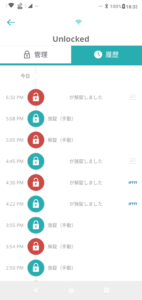
明確に{API}と表示されるのとレスポンスは、3秒程度で連続して可能です。
It is possible to respond continuously in about 3 seconds with the clear display of {API}.
途方もなく汚いソースですがシンプルが一番。
NGの部分は対策も必要ですし、本当にロックされたか、されていないかも必要でしょうが
この点は、candyhouseからメッセージや通知が届くので不要なロジックは改めて作る必要はないですね。
It’s a ridiculously dirty sauce, but simple is the best.
The NG part needs countermeasures, and it may or may not be really locked.
In this regard, you don’t need to recreate unnecessary logic because you will receive messages and notifications from candyhouse.