Windows10:本当に、100%利用しないのに、無駄に資源を使う標準アプリをアンインストール(削除)する!
PowerShellを使う!
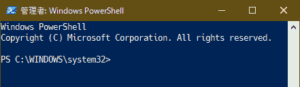
PowerShellを管理者として起動し、
消したいアプリの削除用コマンドを実行。
スタートメニューを左クリック
「powershell」と打ち込む
(ただ、打てば良い。入力欄に勝手に入る)
『管理者として実行する』を選択
PowerShell初期画面
英)Candy Crush Friends
ゲーム。
Get-AppxPackage king.com.CandyCrushFriends | Remove-AppxPackage
英)Farm Heroes Saga
ゲーム。
Get-AppxPackage king.com.FarmHeroesSaga | Remove-AppxPackage
英)Groove ミュージック
音楽を聴く・買う。
Get-AppxPackage Microsoft.ZuneMusic | Remove-AppxPackage
英)Microsoft Solitaire Collection
ゲーム。
一度削除してしまうと、Microsoft Storeで再インストールしても動かなくなります。
(タイトルが表示されて即終了する。原因不明)
Get-AppxPackage Microsoft.MicrosoftSolitaireCollection | Remove-AppxPackage
英)Office(を始めよう)
Web版Officeへのリンク集?
Officeを使っていないなら不要。
Get-AppxPackage Microsoft.MicrosoftOfficeHub | Remove-AppxPackage
英)OneNote
デジタルノート。
Get-AppxPackage Microsoft.Office.OneNote | Remove-AppxPackage
英)Print 3D
3Dデーター を 3Dプリンター で印刷(造形)できる。
立体物を印刷(造形)しないなら不要。
常に、利用できるがすでに従来にあるので削除
Get-AppxPackage Microsoft.Print3D | Remove-AppxPackage
英)Skype
IP電話。
Get-AppxPackage Microsoft.SkypeApp | Remove-AppxPackage
英)Spotify
音楽配信サービス
Get-AppxPackage SpotifyAB.SpotifyMusic | Remove-AppxPackage
Xbox Game Bar
Windowsキー() + G で呼び出せるメニュー(参照 Google検索)。
動画キャプチャなどができる。
Get-AppxPackage Microsoft.XboxGamingOverlay | Remove-AppxPackage
Xbox Live
ゲーム用オンラインサービス。
Get-AppxPackage Microsoft.Xbox.TCUI | Remove-AppxPackage
Xbox 本体コンパニオン
Xbox(ゲーム機)のゲームをパソコンでプレイできるようになる模様。
Get-AppxPackage Microsoft.XboxApp | Remove-AppxPackage
Xbox その他
「Xbox Live」「Xbox 本体コンパニオン」「Xbox Game Bar」メニュー
Get-AppxPackage Microsoft.XboxGameOverlay | Remove-AppxPackage
Get-AppxPackage Microsoft.XboxIdentityProvider | Remove-AppxPackage
Get-AppxPackage Microsoft.XboxSpeechToTextOverlay | Remove-AppxPackage
映画 & テレビ
Get-AppxPackage Microsoft.ZuneVideo | Remove-AppxPackage
す)スマホ同期
スマホ(Android / iPhone)の写真を見る、SMS送信、スマホのEdgeブラウザで開いているページをパソコンで開くといった事ができる。
しかし、同期に関して中途半端、遅延は多く、認証遅延はデータも破壊する。
Get-AppxPackage Microsoft.YourPhone | Remove-AppxPackage
メッセージング
SMS送受信。
通話SIM挿してないなら不要?
SIM使って無いので完全に不要。
Get-AppxPackage Microsoft.Messaging | Remove-AppxPackage
モバイル通信プラン
SIMカード通信の初期設定?
説明が全く理解不能なので、たぶん自分が使ってる業者の説明書読んだほうが早いw
SIM使って無いので完全に不要。
Get-AppxPackage Microsoft.OneConnect | Remove-AppxPackage
一括
Get-AppxPackage Microsoft.Office.OneNote | Remove-AppxPackage
Get-AppxPackage Microsoft.SkypeApp | Remove-AppxPackage
Get-AppxPackage SpotifyAB.SpotifyMusic | Remove-AppxPackage
Get-AppxPackage Microsoft.XboxGamingOverlay | Remove-AppxPackage
Get-AppxPackage Microsoft.Xbox.TCUI | Remove-AppxPackage
Get-AppxPackage Microsoft.XboxApp | Remove-AppxPackage
Get-AppxPackage Microsoft.XboxGameOverlay | Remove-AppxPackage
Get-AppxPackage Microsoft.XboxIdentityProvider | Remove-AppxPackage
Get-AppxPackage Microsoft.XboxSpeechToTextOverlay | Remove-AppxPackage
Get-AppxPackage Microsoft.ZuneVideo | Remove-AppxPackage
Get-AppxPackage Microsoft.YourPhone | Remove-AppxPackage
Get-AppxPackage Microsoft.Messaging | Remove-AppxPackage
Get-AppxPackage Microsoft.OneConnect | Remove-AppxPackage
Get-AppxPackage Microsoft.Microsoft3DViewer | Remove-AppxPackage
Get-AppxPackage king.com.CandyCrushFriends | Remove-AppxPackage
Get-AppxPackage king.com.FarmHeroesSaga | Remove-AppxPackage
Get-AppxPackage Microsoft.ZuneMusic | Remove-AppxPackage
Get-AppxPackage Microsoft.MicrosoftSolitaireCollection | Remove-AppxPackage
Get-AppxPackage Microsoft.MicrosoftOfficeHub | Remove-AppxPackage