
2020/10月ごろからすでに、alexaではESP系が動作しない!
海外では、そこまで厳しくないが、日本でESP系を利用するには、IFTTT等の課金サービスを経由しないとまったく利用できない!
そこでスケッチを停止していたが、どうも最近になってようやくできるような状況になってきたかもしれいない。
そこで、alexaに対応するESP系準備!
https://github.com/vintlabs/fauxmoESP
https://github.com/me-no-dev/ESPAsyncUDP
https://github.com/me-no-dev/ESPAsyncTCP
をそれぞれダウンロードで、自分のライブラリに展開する
続きを読む arduino:alexaに対応するESP系準備!:Arduino: Preparation for ESP for Alexa!
「知らないって事」カテゴリーアーカイブ
arduino:PC変更で新規導入!:arduino: Newly introduced by changing PC!
PC新規なのでarduinoを新規導入!
中古PCにSSD 3スロットに換装してユーザファイルをすべてユーザSSDにしたので少々面倒だった。
OS,TEMP,DATAという構成。
通常であれば、すべてが1枚のSSDだろうけど、その選択は危うい!
HDDならまだしも、SSDの寿命は、キャッシュアクセスが争点だろう。
なので、負荷分散させている。
これが、運を悪くさせた。
最新のグーグルドライブは、仮想ドライブを勝手に構築する。
なので自分が設定していた仮想ドライブに強制的に変更されたので、インストールキャッシュがドライブレターごと消失!
本当に破壊しやがった。
すべて再構築する羽目に!
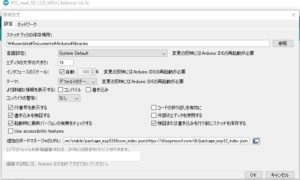
とりあえずだ、arduinoを再設定!
Since the PC is new, arduino is newly introduced!
It was a little troublesome because I replaced the used PC with an SSD 3 slot and made all the user files user SSDs.
The configuration is OS, TEMP, DATA.
Normally, everything would be one SSD, but the choice is dangerous!
If it is an HDD, cache access will be an issue for the life of SSD.
Therefore, the load is distributed.
This made me unlucky.
The latest Google Drive builds virtual drives on its own.
So I was forced to change to the virtual drive I had set, so the installation cache disappeared along with the drive letter!
It really destroyed.
You have to rebuild everything!
For the time being, reset the arduino!
ボードの設定
続きを読む arduino:PC変更で新規導入!:arduino: Newly introduced by changing PC!
Arduino:1.8.16になったので更新!:Arduino:1.8.16になったので更新!
作り始めてようやく1年が経過!
各部屋の環境センサーは、全く問題なく
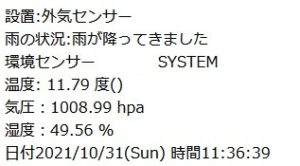
常に監視してくれるのは安心!
9軸センサーの変更で少しやろうかと開くと
そのArduinoが更新されていた!
おお!
https://www.arduino.cc/en/software
Arduino IDE 1.8.16
https://downloads.arduino.cc/arduino-1.8.16-windows.zip
更新の手法は簡単!
バックアップは、事前に行って
ダウンロードしてインストールフォルダに上書きするだけ
次に、USBドライバーを、最新のものに変更しておきましょう!
VCP ドライバのダウンロードとインストール
https://jp.silabs.com/developers/usb-to-uart-bridge-vcp-drivers
自分はこれを入れて全く問題なく利用できるようになりました。
https://jp.silabs.com/documents/public/software/CP210x_Universal_Windows_Driver.zip
今度は問題なし!

実機も変更したので設定はこのように
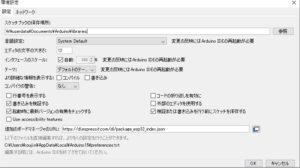
今回利用するのは、ESP32 技適仕様なので最新のものにしたほうが良いと感じていた。
ホッとした。
———————-
It’s been a year since I started making it!
The environmental sensor in each room has no problem at all
Rest assured that you will be constantly monitored!
When I open it to do a little by changing the 9-axis sensor
The Arduino was updated!
Oh!
Arduino IDE 1.8.16
The update method is easy!
Make a backup in advance
Just download and overwrite the installation folder
Next, let’s change the USB driver to the latest one!
Download and install VCP driver
I put this in and now I can use it without any problems.
No problem this time!
Since the actual machine was also changed, the setting is like this
I felt that it would be better to use the latest version because it is an ESP32 technically suitable specification to be used this time.
I was relieved
———————-
———————-
Es ist ein Jahr her, seit ich angefangen habe, es zu machen!
Der Umweltsensor in jedem Raum hat überhaupt kein Problem
Seien Sie versichert, dass Sie ständig überwacht werden!
Wenn ich es öffne, um ein wenig zu tun, indem ich den 9-Achsen-Sensor ändere
Der Arduino wurde aktualisiert!
Oh!
Arduino-IDE 1.8.16
Die Update-Methode ist einfach!
Vorher ein Backup erstellen
Einfach den Installationsordner herunterladen und überschreiben
Als nächstes ändern wir den USB-Treiber auf den neuesten!
Laden Sie den VCP-Treiber herunter und installieren Sie ihn
Ich habe es eingebaut und kann es jetzt ohne Probleme verwenden.
Diesmal kein Problem!
Da auch die eigentliche Maschine geändert wurde, ist die Einstellung so
Ich hatte das Gefühl, dass es besser wäre, die neueste Version zu verwenden, da es sich diesmal um eine technisch geeignete ESP32-Spezifikation handelt.
Ich war erleichtert
———————-
———————-
Cela fait un an que j’ai commencé à le faire !
Le capteur environnemental dans chaque pièce ne pose aucun problème
Soyez assuré que vous serez constamment surveillé!
Quand je l’ouvre pour faire un peu en changeant le capteur 9 axes
L’Arduino a été mis à jour !
Oh!
IDE Arduino 1.8.16
La méthode de mise à jour est simple !
Faire une sauvegarde à l’avance
Il suffit de télécharger et d’écraser le dossier d’installation
Ensuite, changeons le pilote USB pour le dernier !
Téléchargez et installez le pilote VCP
Je l’ai mis et maintenant je peux l’utiliser sans aucun problème.
Pas de problème cette fois !
Étant donné que la machine réelle a également été modifiée, le réglage est le suivant
J’ai estimé qu’il serait préférable d’utiliser la dernière version car il s’agit d’une spécification ESP32 techniquement appropriée à utiliser cette fois.
J’étais soulagé
———————-