「機器のつぶやき」カテゴリーアーカイブ

Fritzing:スマートホームに必要な電源ONOFFするモジュールの作成に

最近のスマートホームユニットで、IFTTTでの操作が半分になるが

これ

問題無いのだがこの程度なら自分でと思うようになり
ESP8266
ESP-01
で自作を初めて1月ほど
悩みの種が、購入モジュールが存在しない事。
環境センサーの組み合わせで自動化できるのでばっちり
モジュールの多様化に、すでにメモ帳が煩雑。!
作成したビルドを残しているのだが面倒に
だからと言ってCADを使っても、かけた時間より、起動時間が負担。
そこで作り始めた
必要なソフトは、フリーソフト
fritzing
これは、電子回路の簡便な?いえいえ
結構スマートにプログラムできます。
ただし、それなりの属性を設定すればだが
https://fritzing.org/home/

※注意は、インストール先を、自分だけのフォルダに保存したほうがよかった。
windows10 1903で消失する事があったから。

良かったら寄付を
とりあえず自分
最近のフリーソフトで有益なのはすぐに寄付する。
https://donorbox.org/fritzing?default_interval=m&amount=7

arduino
モジュールのプログラム
の作成と書き込み
https://www.arduino.cc/

良かったら寄付を
自分は、まだ寄付をしていないが
結構便利になりつつあるので自分の
お金から少しづつ。
https://www.arduino.cc/en/Main/Contribute

inkscape
https://inkscape.org/ja/

良かったら寄付を
自分は、まだ寄付をしていないが
結構便利になりつつあるので自分の
お金から少しづつ。
https://inkscape.org/ja/contribute/

ここまで
続きを読む Fritzing:スマートホームに必要な電源ONOFFするモジュールの作成に

Windows10:1903で障害、電源を入れると一度電源が落ちる? 対策

Windows10:1903で障害、電源を入れると一度電源が落ちる?
対策

1903に更新してようやく解決。
何が問題だったか

シャットダウン前のCPU・メモリなどのデバイスの状態を保存することで、
次回起動時に高速にスタートアップ
デフォルトでは高速スタートアップが有効になっています。

シャットダウン時の正常なシャットダウンが行われないから起きた
要は、バックグランドで動作している各種のアプリ更新など
強制的に動作させる面倒なソフトが起因により1903以降、
正常なシャットダウンができない状態に。

そこで対処方法は、この高速スタートアップを無効にすれば良いだけです。
SSDを利用しているのであれば時間に差は生まれません。
HDDでは、各種ソフトやドライバーが対応されるまで我慢です。

In Windows10: 1903, when the power is turned on, the power goes down once.
Measures

Updated to 1903 and finally solved.
What was the problem

By saving the state of devices such as CPU and memory before shutdown,
Fast startup at next startup
By default, fast startup is enabled.

Occurs because normal shutdown is not performed at shutdown
In short, updating various apps running in the background
After 1903 due to troublesome software to forcibly operate,
A state where normal shutdown is not possible.

The only workaround is to disable this fast startup.
If you use SSD, there will be no time difference.
With HDD, we are patient until various software and drivers are supported.

検索に
電源オプション
といれます。
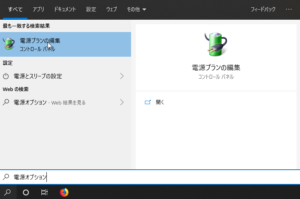
SnapCrab_NoName_2019-8-17_13-34-10_No-00
To search
Power options
It can be said.

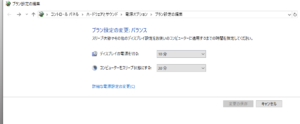
表示したいのは、電源オプションなので、電源オプションをクリックします。
SnapCrab_NoName_2019-8-17_13-37-29_No-00
Since you want to view the power options, click the power options.

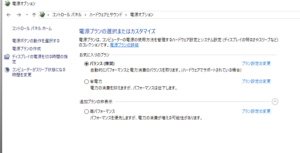
右の「電源ボタンの動作を選択する」をクリック
Click “Select power button action” on the right
SnapCrab_NoName_2019-8-17_13-37-51_No-00

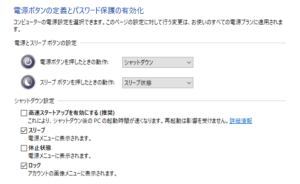
現在利用可能でない設定を変更します
Change settings that are not currently available
SnapCrab_NoName_2019-8-17_13-40-52_No-00

これを、チェックするかどうかです。

チェックを外すと問題なく起動します。
バッチファイルでもどうにかなりますが、使い方
覚えていたほうが、何かと便利です。

Whether to check this.

If you remove the check, it will start without problems.
It’s pretty much a batch file, but how to use
It ’s more convenient to remember.

機器を永続的な利用を考慮していないので
ある程度、推奨されていない機器を使う人は
ある意味、自分でも知識を蓄えたほうが無難。

Because the device is not considered for permanent use
To some extent, people who use devices that are not recommended
In a sense, it is safer to accumulate knowledge yourself.

スマートホームに向けて36a:各部屋センサーのユニット化

環境センサー72時間稼働させてすこぶる問題ない
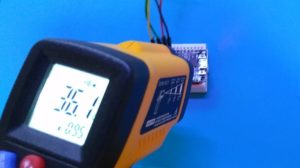
そこで、実機の状況を確認した

IMG_20190804_132953

There are no problems with operating the environmental sensor for 72 hours
So we confirmed the situation of the actual machine

すべてにおいてこの温度から上がることはなかった。
問題なのは、非常に高温になった場合の安全確保である。
評価ユニットであるため、信頼性の確保を優先。
問題なし。
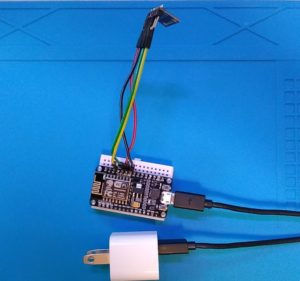
IMG_20190804_133216
Nothing went up from this temperature at all.
The problem is to ensure safety in the event of very high temperatures.
As it is an evaluation unit, priority is given to securing reliability.
no problem.

これで、
環境センサーのユニット化を実現できる。

with this,
It can realize unitization of environmental sensors.

まず購入すべきは、AC-DCモジュールユニット
通常スマートホンのアダプタや百均で購入できるアダプタでも良いが、
問題は、持続した構造になっているかどうか
今までを見るからに、結構無理を生じさせる構成のような?
なので、今回はスペースよりも安全性で
このモジュール
見たらわかるけど、ポリスイッチ搭載型
温度による物理スイッチなので、正確に切れます。
自作には、必ずつけました。
ESPは基本的に80-100mA程度あればよいはずなので、十分です。
月の電気料金は、0.14円ですね。

AC-DC module unit should be purchased first
Normally, you may use a smartphone adapter or an adapter that can be purchased on a pay-as-you-go basis.
The question is whether it has a sustained structure
In from view until now, such as the configuration to produce a pretty unreasonable?
So it’s safer than space this time
This module
You can see if you look at it, but with a poly switch
As it is a physical switch by temperature, it cuts off correctly.
To homebrew, we put always.
Basically, it should be around 80-100 mA for ESP, so it’s enough.

あとは、ESPモジュールと環境センサーモジュール
部屋の数、計測したい箇所数分

SnapCrab_NoName_2019-8-4_2-25-44_No-00

After, ESP module and environmental sensor module
Number of rooms, minutes to measure

これだけ多量なので、ルータの貧弱DHCPは使ってはいけないだろう。
Because this is a lot, you should not use poor DHCP on your router.

続きを読む スマートホームに向けて36a:各部屋センサーのユニット化