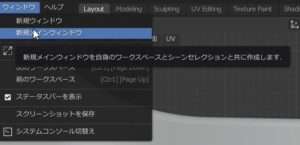
これをクリックすると操作画面がワークスペース扱いになるのでその画面を別な画面で表示すればマルチ画面達成。
他の高額ソフトこんなに簡単じゃなかったと思う。
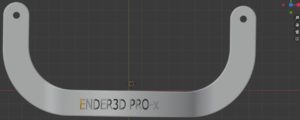
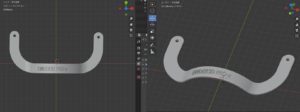
次に画面事視点を変更する。
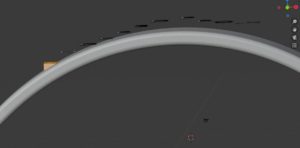
Z方向に選択したオブジェクト
If you click this, the operation screen will be treated as a workspace, so if you display that screen on another screen, you will achieve multi-screen.
I don’t think it was as easy as other expensive software.
Next, the screen viewpoint is changed.
Object selected in Z direction
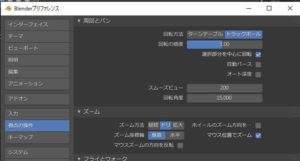
少し傾けたY軸方法を選択が継承されている。
The Y-axis method with a slightly tilted selection is inherited.
マウスの位置で視点を変えたい。
これも簡単でした。
編集
プリファレンス
視点の操作
I want to change the viewpoint with the mouse position.
This was easy too.
Edit
Preferences
Manipulating the viewpoint

![[商品価格に関しましては、リンクが作成された時点と現時点で情報が変更されている場合がございます。]](https://hbb.afl.rakuten.co.jp/hgb/123b38de.ec01abcc.123b38df.ff57ee17/?me_id=1217214&item_id=11692762&m=https%3A%2F%2Fthumbnail.image.rakuten.co.jp%2F%400_mall%2Fakibamac%2Fcabinet%2F20191223used%2F2133021608660.jpg%3F_ex%3D80x80&pc=https%3A%2F%2Fthumbnail.image.rakuten.co.jp%2F%400_mall%2Fakibamac%2Fcabinet%2F20191223used%2F2133021608660.jpg%3F_ex%3D128x128&s=128x128&t=picttext "[商品価格に関しましては、リンクが作成された時点と現時点で情報が変更されている場合がございます。]")
![[商品価格に関しましては、リンクが作成された時点と現時点で情報が変更されている場合がございます。]](https://hbb.afl.rakuten.co.jp/hgb/12326086.fcd9ec42.12326087.5cdd211c/?me_id=1210933&item_id=12172880&m=https%3A%2F%2Fthumbnail.image.rakuten.co.jp%2F%400_mall%2Fdtc%2Fcabinet%2F20191223used%2F2133021608660.jpg%3F_ex%3D80x80&pc=https%3A%2F%2Fthumbnail.image.rakuten.co.jp%2F%400_mall%2Fdtc%2Fcabinet%2F20191223used%2F2133021608660.jpg%3F_ex%3D128x128&s=128x128&t=picttext "[商品価格に関しましては、リンクが作成された時点と現時点で情報が変更されている場合がございます。]")
![[商品価格に関しましては、リンクが作成された時点と現時点で情報が変更されている場合がございます。]](https://hbb.afl.rakuten.co.jp/hgb/123b38de.ec01abcc.123b38df.ff57ee17/?me_id=1217214&item_id=11284084&m=https%3A%2F%2Fthumbnail.image.rakuten.co.jp%2F%400_mall%2Fakibamac%2Fcabinet%2F20190731n%2F4515777562997.jpg%3F_ex%3D80x80&pc=https%3A%2F%2Fthumbnail.image.rakuten.co.jp%2F%400_mall%2Fakibamac%2Fcabinet%2F20190731n%2F4515777562997.jpg%3F_ex%3D128x128&s=128x128&t=picttext "[商品価格に関しましては、リンクが作成された時点と現時点で情報が変更されている場合がございます。]")
![[商品価格に関しましては、リンクが作成された時点と現時点で情報が変更されている場合がございます。]](https://hbb.afl.rakuten.co.jp/hgb/13a65bf2.7c3b7c25.13a65bf3.e91e69ec/?me_id=1208050&item_id=10060864&m=https%3A%2F%2Fthumbnail.image.rakuten.co.jp%2F%400_mall%2Fesupply%2Fcabinet%2Fproduct_e_5%2Fez1-la011_1.jpg%3F_ex%3D80x80&pc=https%3A%2F%2Fthumbnail.image.rakuten.co.jp%2F%400_mall%2Fesupply%2Fcabinet%2Fproduct_e_5%2Fez1-la011_1.jpg%3F_ex%3D128x128&s=128x128&t=picttext "[商品価格に関しましては、リンクが作成された時点と現時点で情報が変更されている場合がございます。]")
![[商品価格に関しましては、リンクが作成された時点と現時点で情報が変更されている場合がございます。]](https://hbb.afl.rakuten.co.jp/hgb/13a65bf2.7c3b7c25.13a65bf3.e91e69ec/?me_id=1208050&item_id=10076444&m=https%3A%2F%2Fthumbnail.image.rakuten.co.jp%2F%400_mall%2Fesupply%2Fcabinet%2Fproduct_e_18%2Feex-la016_1.jpg%3F_ex%3D80x80&pc=https%3A%2F%2Fthumbnail.image.rakuten.co.jp%2F%400_mall%2Fesupply%2Fcabinet%2Fproduct_e_18%2Feex-la016_1.jpg%3F_ex%3D128x128&s=128x128&t=picttext "[商品価格に関しましては、リンクが作成された時点と現時点で情報が変更されている場合がございます。]")