windows10 の検索が、すでにアホレベルなので違うソフトを導入とwindows10標準サービスの停止
もう我慢できませんね。
というより、改悪に続く改悪です。
既に、アホレベルですね。
検索に -1を入力すると-1にマッチすると判断しますが
結果は
まず、1 を捜索、-を捜索 -1は数量が多いので省かれます。
I can’t stand it anymore.
Rather, it is an aggravation that follows the aggravation.
It’s already stupid level.
If you enter -1 in the search, it will be judged as matching -1.
Result is
First, search for 1 and search for–1 is omitted due to the large quantity.
Ich kann es nicht mehr aushalten.
Es ist vielmehr eine Verschlimmerung, die der Verschlimmerung folgt.
Es ist schon dummes Niveau.
Wenn Sie in der Suche -1 eingeben, wird es als übereinstimmend mit -1 bewertet.
Ergebnis ist
Zuerst wird die Suche nach 1 und die Suche nach–1 wegen der großen Menge weggelassen.
Je ne peux plus le supporter.
C’est plutôt une aggravation qui suit l’aggravation.
C’est déjà un niveau stupide.
Si vous entrez -1 dans la recherche, il sera jugé comme correspondant à -1.
Le résultat est
Tout d’abord, rechercher 1 et rechercher–1 est omis en raison de la grande quantité.
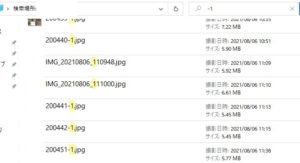
これ
馬鹿レベルですよね。
要は、単語検索を標準としている点で馬鹿でしょう。
windows10 の検索目的は、個人の検索リソースを使って世界のクラウドの情報を取得する事にあります。
要は、検索が主目的でありません。情報を、収集し故意に自分達の情報を集計、今何をという観点のみ存在している感じです。
情報のリテラシーにおかしいですね。
this
It’s an idiot level, isn’t it?
In short, it’s foolish in that word search is the standard.
The purpose of searching windows10 is to use personal search resources to get information about the cloud in the world.
In short, search is not the main purpose. We collect information and deliberately aggregate our information, and it feels like there is only a point of view now.
It’s strange about information literacy.
Dies
Es ist ein Idioten-Level, nicht wahr?
Kurz gesagt, es ist töricht, dass die Wortsuche der Standard ist.
Der Zweck der Suche in Windows10 besteht darin, persönliche Suchressourcen zu verwenden, um Informationen über die Cloud in der Welt zu erhalten.
Kurz gesagt, die Suche ist nicht der Hauptzweck. Wir sammeln Informationen und aggregieren unsere Informationen absichtlich, und es fühlt sich an, als gäbe es jetzt nur einen Standpunkt.
Es ist seltsam in Bezug auf Informationskompetenz.
cette
C’est un niveau idiot, n’est-ce pas ?
En bref, c’est stupide dans cette recherche de mots est la norme.
Le but de la recherche Windows10 est d’utiliser des ressources de recherche personnelles pour obtenir des informations sur le cloud dans le monde.
Bref, la recherche n’est pas le but principal. Nous collectons des informations et agrégeons délibérément nos informations, et il semble qu’il n’y ait plus qu’un point de vue maintenant.
C’est étrange à propos de la maîtrise de l’information.
その上で、windows10標準サービス はファイルの他に、サードパティーのセキュリティソフトが、導入しているのに
バックエンドで、多大なリソースと使っているので、古いPCなどが遅延しているのも理解できます。
このような迷惑より、世界の資源を枯渇するような状況となっています。
まともな動作もしないwindows10標準サービスを停止
その上で明確、正確、リソースは標準のこのソフトを使う事により
従来のPCでも、何も困ることなく利用できます。
Everything フォルダ
On top of that, the windows10 standard service is installed by third-party security software in addition to files.
Since it uses a lot of resources on the back end, it is understandable that old PCs etc. are delayed.
Due to such annoyance, the world’s resources are being depleted.
Stop windows 10 standard service that doesn’t work properly
On top of that, clear, accurate, resources are available by using this standard software
You can use it on a conventional PC without any trouble.
Everything folder
Darüber hinaus wird der Windows10-Standarddienst neben Dateien von einer Sicherheitssoftware von Drittanbietern installiert.
Da es viele Ressourcen im Backend verbraucht, ist es verständlich, dass alte PCs etc. verzögert werden.
Aufgrund dieses Ärgers werden die Ressourcen der Welt erschöpft.
Stoppen Sie den Windows 10-Standarddienst, der nicht richtig funktioniert
Darüber hinaus stehen durch die Verwendung dieser Standardsoftware klare, genaue Ressourcen zur Verfügung
Sie können es problemlos auf einem herkömmlichen PC verwenden.
Alles Ordner
En plus de cela, le service standard Windows10 est installé par un logiciel de sécurité tiers en plus des fichiers.
Comme il utilise beaucoup de ressources en arrière-plan, il est compréhensible que les anciens PC, etc. soient retardés.
En raison d’un tel ennui, les ressources mondiales s’épuisent.
Arrêtez le service standard de Windows 10 qui ne fonctionne pas correctement
En plus de cela, des ressources claires et précises sont disponibles en utilisant ce logiciel standard
Vous pouvez l’utiliser sur un PC classique sans aucun problème.
Tout le dossier
https://www.voidtools.com/
を導入して
-1を検索をかけました。
結果
Introduced
I searched for -1.
result
Eingeführt
Ich habe nach -1 gesucht.
Ergebnis
Introduit
J’ai cherché -1.
résultat

これで、2秒で思った成果になりました。
windows10 の検索は、苛立ちと新しいPCやOSへ目を向けさせる広告のようです。
This is the result I expected in 2 seconds.
Searching for windows10 is like an ad that is frustrating and turns your attention to new PCs and operating systems.
Dies ist das Ergebnis, das ich in 2 Sekunden erwartet habe.
Die Suche nach windows10 ist wie eine frustrierende Anzeige, die Ihre Aufmerksamkeit auf neue PCs und Betriebssysteme lenkt.
C’est le résultat que j’attendais en 2 secondes.
La recherche de Windows10 est comme une annonce frustrante qui attire votre attention sur les nouveaux PC et systèmes d’exploitation.
普通にサービスとして登録するとタスクにこのように表示されて
windows標準検索は全く利用しません。

If you register as a service normally, it will be displayed in the task like this
windows standard search is not used at all.
Wenn Sie sich normal als Dienst registrieren, wird dies in der Aufgabe so angezeigt
Die Windows-Standardsuche wird überhaupt nicht verwendet.
Si vous vous enregistrez en tant que service normalement, il sera affiché dans la tâche comme ceci
La recherche standard de Windows n’est pas du tout utilisée.