LibreOfficeで、年賀状や背表紙の縦書きを作成したい。
MS officeを使えば簡単なのだが、すべてのユーザが持っていない!
libreで作成すれば、すべての人が持っている!クラウドで利用できるメリットは非常に
助かる。
なので、これ!
最新版でなければ最新版に
https://www.libreoffice.org/download/download/
なぜなら、作成したファイル、自動変換は期待しないほうが良い!
表示は、されるが印刷はおかしい時もあるので・・
((+_+))
でもこれはこれで少し楽しい
おかしい場合は、最新版を導入して、そのバージョンで新しいドキュメントを作成
古いドキュメントの中身を、コピーすればよいだけ!
これが一番正常になる
古いLibreがすべて実機に残っていればそのような現象は稀だが
これは、これでクラウド共有のようなファイルは不都合が発生するので・・
それは、さておき
縦書きが、ツールバーに表示したいのでこのようにすれば簡単に表示できる。
表示>ツールバー>カスタマイズ
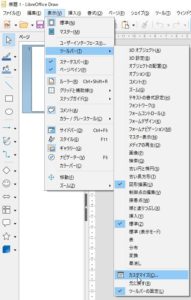
検索に 縦書き と入力すればツールバーに登録できる
縦書きには、すでに3つのツールがあったのはうれしい。
Libre はサイコー 寄付はしている!
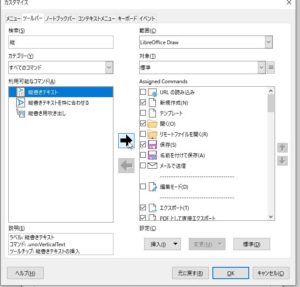
このように、
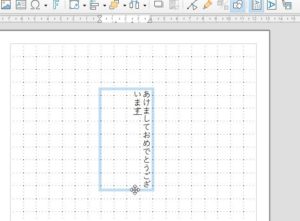
ちなみに、古いファイルは、縦書きになっていても、見ると位置がずれていたら、正直ファイルを
最新版を導入して、そのバージョンで新しいドキュメントを作成
古いドキュメントの中身を、コピーを実施したほうが良い。
I want to create vertical writing for New Year’s cards and spine covers in LibreOffice.
It’s easy with MS office, but not every user has it!
If you create it with libre, everyone has it! The benefits available in the cloud are huge
It helps.
So this!
If it is not the latest version, go to the latest version
Because you shouldn’t expect the created file and automatic conversion!
It is displayed, but sometimes the printing is strange …
((+ _ +))
But this is a little fun with this
If something goes wrong, install the latest version and create a new document with that version
All you have to do is copy the contents of the old document!
This will be the most normal
Such a phenomenon is rare if all the old Libre remains on the actual machine.
This is because files like cloud sharing will be inconvenient …
That aside
I want to display vertical writing on the toolbar, so I can easily display it like this.
View & gt; Toolbar & gt; Customize
You can register it in the toolbar by entering vertical writing in the search.
I’m glad that there were already three tools for vertical writing.
Libre is making a great donation!
in this way,
By the way, even if the old file is written vertically, if the position is misaligned when you look at it, honestly file it.
Introduce the latest version and create new documentation with that version
It is better to copy the contents of the old document.
Ich möchte in LibreOffice vertikale Schriften für Neujahrskarten und Buchrücken erstellen.
Es ist einfach mit MS Office, aber nicht jeder Benutzer hat es!
Wenn Sie es mit libre erstellen, hat es jeder! Die Vorteile der Cloud sind enorm
Es hilft.
Also das!
Wenn es nicht die neueste Version ist, gehen Sie zur neuesten Version
Denn die erstellte Datei und automatische Konvertierung sollten Sie nicht erwarten!
Es wird angezeigt, aber manchmal ist der Druck seltsam …
((+_+))
Aber das macht ein bisschen Spaß damit
Wenn etwas schief geht, installieren Sie die neueste Version und erstellen Sie ein neues Dokument mit dieser Version
Sie müssen lediglich den Inhalt des alten Dokuments kopieren!
Das wird das Normalste sein
Ein solches Phänomen ist selten, wenn das gesamte alte Libre auf der tatsächlichen Maschine verbleibt.
Dies liegt daran, dass Dateien wie die Cloud-Freigabe unbequem sind …
Davon abgesehen
Ich möchte vertikale Schrift in der Symbolleiste anzeigen, damit ich sie einfach so anzeigen kann.
Ansicht & gt; Symbolleiste & gt; Anpassen
Sie können es in der Symbolleiste registrieren, indem Sie in der Suche vertikale Schrift eingeben.
Ich bin froh, dass es bereits drei Tools für vertikales Schreiben gab.
Libre macht eine große Spende!
auf diese Weise,
Übrigens, auch wenn die alte Datei vertikal geschrieben ist, wenn die Position beim Betrachten falsch ausgerichtet ist, legen Sie sie ehrlich ab.
Führen Sie die neueste Version ein und erstellen Sie eine neue Dokumentation mit dieser Version
Es ist besser, den Inhalt des alten Dokuments zu kopieren.
Je voudrais créer une écriture longitudinale des cartes du Nouvel An et du papier épinée à LibreOffice.
Il est facile d’utiliser MS Office, mais pas tous les utilisateurs!
Si vous créez avec Libre, toutes les personnes ont! Les avantages disponibles dans le cloud sont très
Subvention.
Donc ça!
Si ce n’est pas la dernière version, la dernière version
Parce que le fichier que vous avez créé, la conversion automatique ne doit pas être attendue!
L’affichage est, mais l’impression est drôle.
((+ _ +))
Mais c’est un peu amusant avec ça
Si c’est drôle, introduisez la dernière version et créez un nouveau document dans cette version
Copiez simplement le contenu de l’ancien document!
C’est le plus normal
Un tel phénomène est rare si l’ancien Libre reste sur la machine actuelle
Ceci est que des fichiers tels que les actions cloud ne sont pas disponibles.
C’est exact
Étant donné que l’écriture verticale est susceptible d’être affichée dans la barre d’outils, elle peut être facilement affichée.
View & GT; Toolbar & GT; Personnaliser
Vous pouvez vous inscrire dans la barre d’outils si vous entrez une écriture verticale à la recherche.
Il est agréable d’avoir trois outils pour l’écriture verticale.
Libre est donné donation!
de cette façon,
Au fait, même si l’ancien fichier est vertical, si vous regardez la position, le fichier honnête
Introduisez la dernière version et créez un nouveau document dans cette version
Vous devriez effectuer la copie du contenu de l’ancien document.